Bug with Plugins Folder in iCloud

I have had this problem for ages now. I already contacted support a long time ago but got no response.

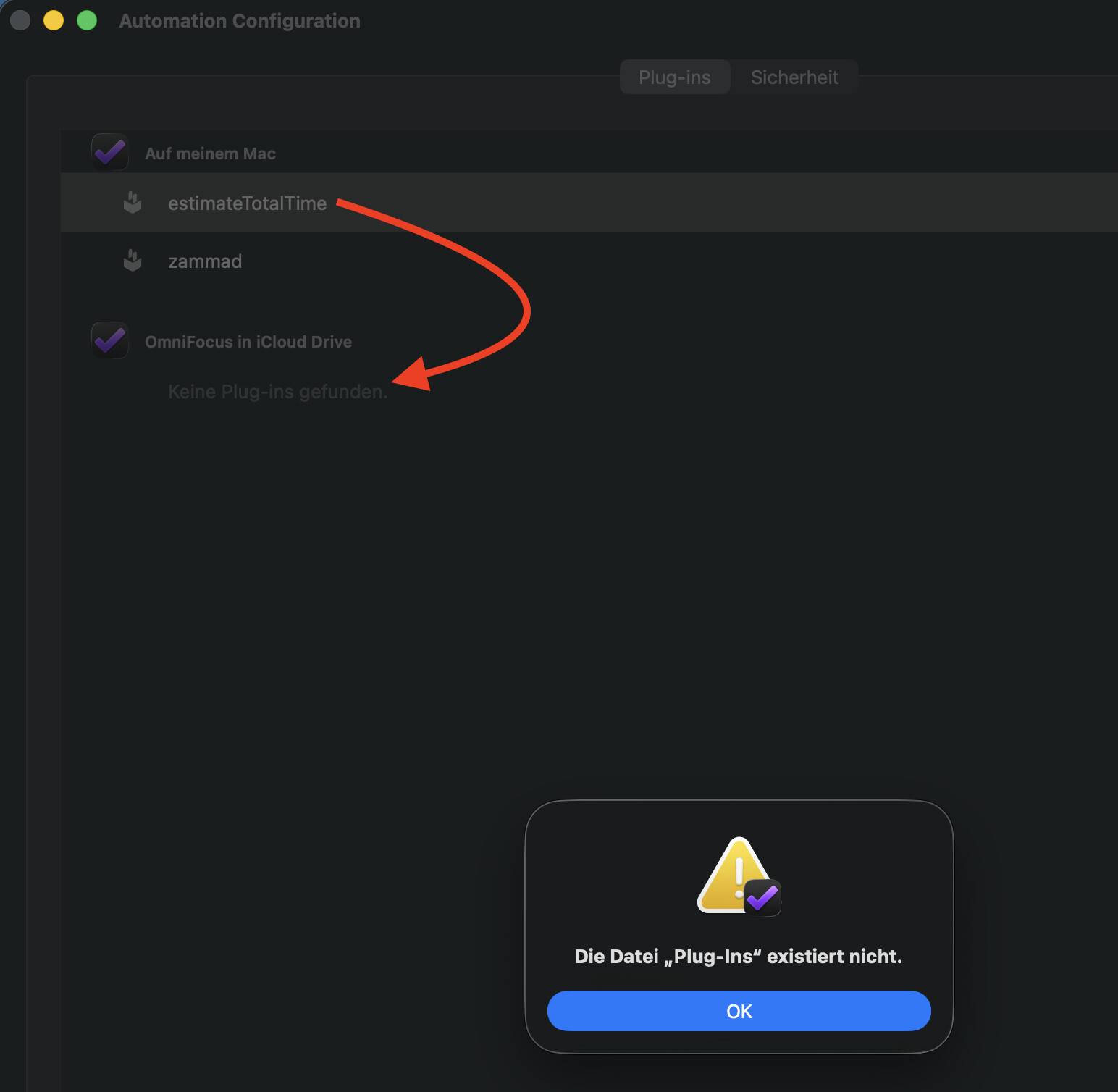
The problem is I can’t move plugins from the local disk into the iCloud folder. I always get this error:

I guess this happened way back, as I used Todoist for a short time and removed the folder in iCloud manually. But this was with OF3. But still on OF4 the same problem, and the app seems not to create the missing folder.

Does anybody have an idea how to fix that? I also tried to manually create folders in iCloud Drive, but that did not help.

Thanks in advance

In what order did you create the folders?
iCloud Drive > OmniFocus > Plug-ins

Снимок экрана 2025-10-10 в 18.01.55

Yes like this:
grafik
But his manual creation does not solve it

I assume that you tried installing plugins using an iPhone or iPad.
Installing Plug-Ins

–––
The source folder with the plugins is located here.


Users › ??? › Library › Containers › OmniFocus › Data › Library › Application Support › Plug-Ins

Only on Mac, since I have the Pugin on my Mac anyway, I just want to move it to the iCloud to access it on my iPhone.


