Export JPEG resolution, & very low proof quality from a business card service bureau

I’m seeking input on a very low resolution PDF proof from my uploaded front size JPEG of a standard size business card to moo.com, a service bureau. My question is at the end of this post.

BACKGROUND

About 12 years ago, I created an OmniGraffle file for the front size of a standard business card. It is comprised of two text ‘fields/blocks’ also created in OmniGraffle, and a separate logo that I created in OmniGraffle, and pasted into the master OmniGraffle file. (The back side of the business card is a photo with a bounding rectangle that I compiled in Photoshop, and exported to JPEG. The back side quality is not a factor here.)

The process is to upload a file (JPEG in my case), then make slight adjustments: manually resize (which is done proportionately, automatically, by their proofing tool) to downsize the image slightly, and move the image left / right / up / down, to keep the image in the “safe” area, and also to make sure there will be no white strip on the outsides. I’m not positive, but I seem to recall that after uploading the front and back JPEG files in my first batch 12 years ago, the PDF proof front size had highly low resolution; I was assured by the bureau that the proof looked good on their end; I ordered, and all was fine.

I’ve since slightly modified the front side, but nothing that should have any negative effect: Removed one block of text, swapped the order of two lines of text in a text block, and made one line of text bold.

I uploaded the front and back sides, downloaded the proof, and the (photo) back side looks fine, but the front side (logo and all text) is highly low resolution. In the bureau’s design page (where I place the image), the front size does not display the low resolution of the PDF proof I download.

The bureau’s guidelines include: “Standard Size Business Cards: Recommended 1098 x 648 pixels” (or higher, I’m assuming).

My JPEG output from Omnigraffle was done at 300 DPI, best quality. It is: 7874 × 4499.

Interestingly, in the JPEG file that I uploaded, in Finder: Get Info > Preview, the image shows pretty much the same (low) resolution as the PDF proof—but when I select the file and tap the spacebar, it looks fine (as it does when I open it). I wonder if this is a clue as to the quality of the proof.

I received a reply from the bureau:

"I have heard from our internal design team and they have informed me that the resolution of the JPEG is just fine, especially when sized down for Business Cards and could work.

However, the only other option would be to recreate the artwork for the Business Card, but in order to do that, we would need a vector logo and font files."

I’m waiting for their reply, but I’m tempted to simply order the pricing, and not use the optional method, which as I understand it, would mean:

  • Save the logo in an SVG format, and have the bureau place in on the card along with the text.

  • Upload the fonts I used: Calibri (which appears to not be a native macOS font, and was installed with Microsoft Office (that I bought)); Adobe Song Std (which appears to not be a native macOS font, and was installed with Adobe CS (that I bought)). I don’t know if the bureau has licenses for those fonts, or if there might be a copyright issue in me uploading the fonts.

QUESTION

Does anyone have any knowledge or hunches about why I’m getting a low resolution front side PDF proof, yet the bureau says the JPEG I uploaded to their site looks OK?

First off, standardize your image quality using an app that provides quantitative metrics for its pixel size and dpi. What you “see” on your monitor when you open with app A versus open with app B versus what is printed versus what someone else “sees” in their reviews can be expected to vary widely. This is why your print company is telling you all is well with your uploaded file even though you are seeing something blurry in viewing it yourself.

Second, any time you open, change, and close a jpeg, you run the risk of altering the image quality. Even the simple action of moving a jpeg on a background and saving the altered image can change its final quality. By example, taking the original image, overlaying it exactly on the shifted image, and subtracting the two will likely give regions of non-zero difference because the jpeg compression running the second time re-calculated the pixel color or intensity. Ultimately, any image that is apt to be moved or adjusted at any point before printing should be created and worked on in an uncompressed format. This demand all but eliminates using jpeg for anything but the final “print this image exactly as it is” case.

Third, as you create your original image, pay attention to the image aspect ratio at printing. Absolutely hold the pixel width x height aspect ratio of the source electronic image to the exact aspect ratio required at printing. When the print company says to send 1098 x 648 = 1.6944444…, your absolute best is to send exactly this aspect ratio. Do not sent 1100 x 648 or 1098 x 650 or 7874 x 4499 = 1.750166… Send EXACTLY the requested aspect ratio. You may use (integer) multiples of their pixel sizes, for example 2196 x 1296 = 1.694444… (i.e. scaled by a factor of 2).

Overall, I think your worst offense is that your source image is not exactly the correct aspect ratio that is required. Fix this problem in the source that you will send. Save the image with at least 600 dpi resolution as a high quality jpeg. All else should fall nicely into place.


JJW

Thank you for your feedback; I appreciate you taking the time.

I’m not sure of what you mean in terms of using a recommended app. Do you mean to use an app other than OmniGraffle for my process? In any case—while I’m not arguing at all about your general advise—I don’t believe that using OmniGraffle has any bearing on creating a perfectly fine JPEG export for my process (more on that in a moment), except perhaps maybe that when I use OmniGraffle for JPEG export, it creates a very low resolution in Finder > Get Info > Preview, and the same in the PDF proof I get from the printing company (but perfectly fine resolution using Finder Quick Look, or opening in a number of other apps).

As I wrote, I’m pretty sure—although not positive—that I had this same issue before: JPEG on my system looks good; very poor proof PDF from the print company; print company says looks good on their end; I ordered the cards; the printed quality was fine.

The difference between my JPEG (good resolution) and the proof (very poor resolution) is massive.

I get and agree with what you’re saying about modifying JPEGs and the possibility of losing image quality. That said, my exported JPEG is totally fine when I preview it in Finder, or open in in Preview, Pixelmator, Photos, etc.

I may try to rework the OmniGraffle master file to achieve the exact recommended pixel size and see what happens, but as I mentioned, the JPEG I uploaded 12 years ago has the same pixel sizes as what I upload recently, and the printed cards I got were excellent. So while what you wrote is absolute best practice, it doesn’t seem to be the issue here. Also, the back side JPEG is 9000 × 5464, and the proof renders perfectly, as did the original batch I had printed 12 year ago. I’m going to keep your advice in my notes.

I will use 600 DPI on my next upload.

To summarize, your advise is great and best practice. My specific case is that:

My JPEG export (from an OmniGraffle source file) of the front size looks great on my system.

Looks great when I do a Finder Quick Look.

Looks great when opened in Preview, Pixelmator, Photos, etc.

Looks great on the printing company’s back end (that only they can see).

Looks terrible on the PDF proof I download.

The printed cards from that JPEG (from 12 years ago) look great; with the same basic JPEG sources (but I think the proof back then was awful as well).

Inspecting the JPEG in Finder > Get Info > Preview shows the same very low resolution as their proof. (Maybe that process is ‘expecting’ certain ratios, and when the ratio is not one of those, the preview is using a different software ‘library’, and shows with very low resolution? Just a wild guess.) Maybe someone at The OmniGroup knows. I’ll file a ticket if I don’t hear from them here.

Apologies for not being clearer.

I mean an app only to validate the image size in pixels and its resolution in dpi after you store it from OmniGraffle in whatever format you choose. I use GraphicConverter.

In a nutshell, you send a high resolution image to the company and they send two images back to you. One is a poor resolution, electronic version proof PDF and the other is a high quality, hard-copy printed card. In this case, you might ask why you cannot get a better quality electronic proof before you sign off on the order. Or, you could decline to pay for the order until you see the hard-copy cards.

The issue is not what you see when you open the JPEG. The issue is whether the company has to make any modifications to the file before they print it. See below.

The fact that you do not use the exact recommended aspect ratio does not say that your final printed card will not be good quality. The fact that you do not use the exact recommended aspect ratio means that someone at the company has to make executive decisions on where to crop and resize and pad your submitted image to fit to their exact, template specifications. With the selected pixel sizes you gave, the editor cannot just resize your image by some integer factor. They have to trim a few pixels here, add a few pixels there, and resize by a factor of 3.141576834 … or some such silly off-integer factor. All of that playing around will change the print quality, even if only by an imperceptible amount.

My recommendations remain. First and foremost, fix your source image to have exactly the required aspect ratio as required by the company. As desired, size the source image to an integer multiple larger than the recommended pixel sizes (i.e. by a factor of 2 or 3). Resizing upward is a trick that can be used to improve the final print image quality. Finally, set the exported resolution to 600 dpi or better. Doing only the latter step without fixing the incorrect aspect ratio still leaves you with someone at the company having to spend time mucking about with it to fit it exactly to their pre-defined template.

In the meantime, also ask the company whether they are able to send their PDF proofs at higher quality. And don’t sweat about the differences that you see in the stored image when you use OmniGraffle versus Preview versus other apps.

Hope this helps clear up any confusions.


JJW

1 Like

Thanks for the GraphicConverter tip. I used to own it. Maybe worthwhile to upgrade.

You are correct; I ought to be able to get a better quality electronic proof. The core of my question is why the backside proof (from my JPEG photo with bounding rectangle) is fine, but the front size (from my JPEG export from OmniGraffle-created log and text) is extraordinary awful in resolution. I believe the printing company thinks the proof I got should have be much higher resolution (with respect to the image they are seeing on their end). That, combined with the fact that I’m getting the same awful resolution in Finder (with the JPEG file selected) > Get Info > Preview makes me think there is something about the OmniGraffle JPEG export, vis-a-vis a sort of preview-oriented matter, that is related to the poor front side proof. To be clear, that JPEG export was done with no pixel size adjustment.

The company made no mention of having to make any modifications to my file before printing—I mean as things stand; not using their alternate method where I upload a SVG logo file and fonts used in text (which they I did not do for my original printing, and which printed fine).

The process in play, is that I uploaded the front side JPEG, had to resize it with their tool (that automatically does so proportionately), as well as moving it left / right / up / down (as required) so there would be no white strip on the edge(s). At that point, I received no additional warnings, I place the order, and the company does not make any adjustments at all to the image size, location, nor anything else. It goes straight to their automated printing process, once approved.

Great idea to ask if they will send PDF proofs at higher quality!

Thank you for all that useful information. I will make my card front size 600DPI, and before the next run (beyond the present, which I want to get a batch done soon), will revise my front size design to match the ratio of the company’s recommended x/y pixel size, and will likely make the (very slight light background) large enough to extend past their tool’s bleed line—meaning I won’t have to make any left / right / up / down placement adjustments to ‘fix’ any edge white strip warnings. For the back side, I added a bounding back rectangle around a photo, both for artistic reason, and so the background would extend beyond the bleed area, and require no modification.

Cheers.

As much as possible, export both images from within the same application. Perhaps that means loading your backside Photoshop image into OmniGraffle or loading your frontside image into Photoshop. Alternatively, confirm with a third-party app (e.g. GraphicConverter) that both images have the same pixel sizes and dpi values.

I would expect the template aspect ratio requirements to be “exact” without have a customer to do hidden math to add for such things as bleed lines. Let alone that the customer should have to do anything beyond upload the image and have it sit automatically centered in the template.

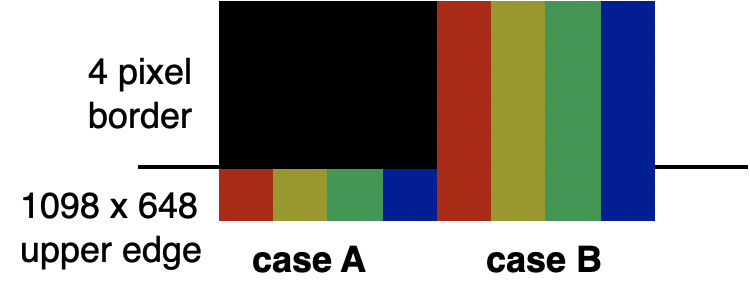
The company should tell you that they take one of two approaches with respect to bleed lines. One is that their template includes a built in bleed lines, for example at 4 pixels all around, making the true print image space as 1090 x 640 pixels. See below.

The alternative approach is that the company manually adds a bleed line border to the image using, for example, a flat color (case A) or a color of the pixel next to the bleed line (case B).

It would be informative to ask as a way to minimize your guess work.


JJW

Very much appreciated!
