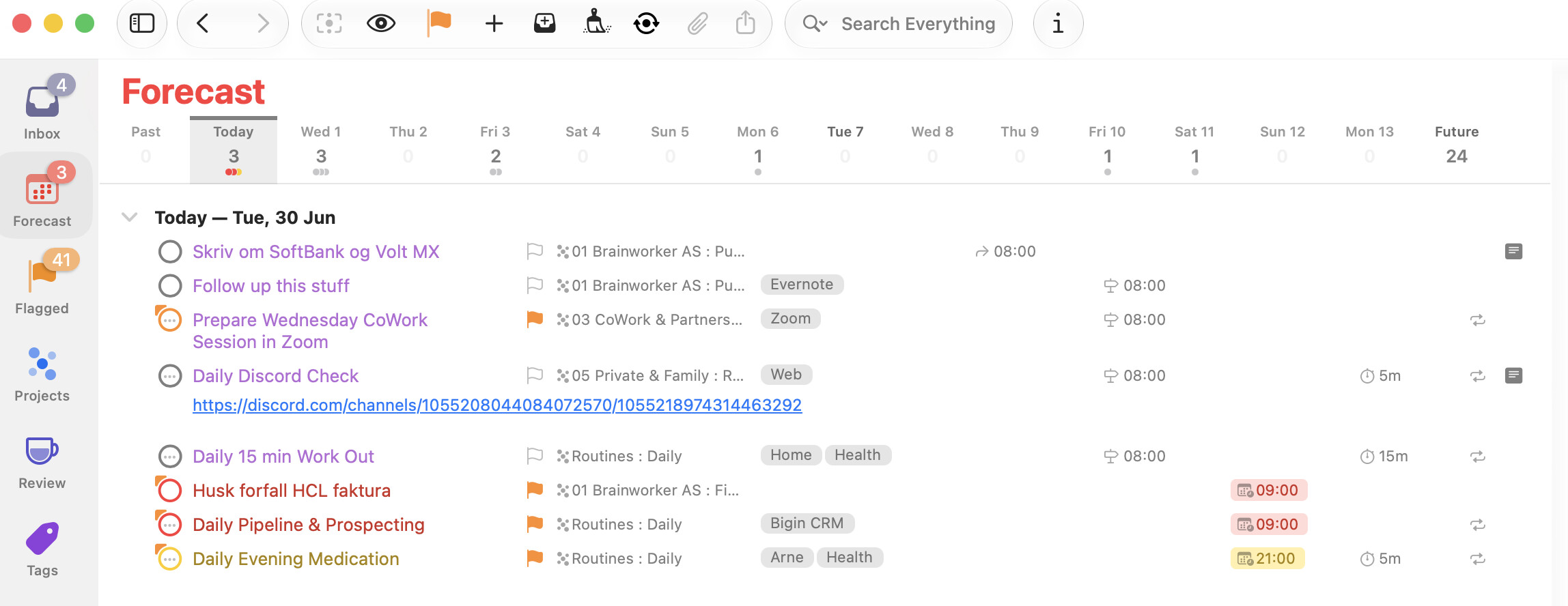
I use a flag as a sign of “Must Do” combined with the Due Day, but I don’t find a way to sort them in the Forecast view (see attached picture) in such a way that Flagged & Due are always shown on top, not mixed into the rest of the to-dos. It seems they only sort by time of day.
Hope any smarter person than me has a solution for this!
Sadly I don’t think this is possible. The rules for how the forecast is sorted (when in “flexible” + “keep sorted” mode) are documented here but are fixed, pretty complex and don’t do what you want.
The nearest you can get is to use “organised” mode that separates out due, defer, planned, forecast tag and flagged into groups - but oddly (to me) flagged is the bottom section. The problem with this mode is that the same task may appear in multiple sections if it’s both flagged and due for example.
Personally I would prefer it if the forecast perspective had the same “structure” options as other perspectives with some enhancement for how to handle calendar events. That way you could group/sort however you wanted.
I recommend using a Custom Perspective instead of Forecast as you’re getting things done. This gives you more control over how things are grouped and ordered. Additionally, you can click tag(s) in the sidebar to filter the list to only show, for example, actions tagged with Home.
I shared some of the ones I use in the Custom Perspectives for OmniFocus directory I host on my Learn OmniFocus site, including On Deck, On Deck: Important and Today.
On Mac, you can download these perspectives and add them to OmniFocus by double-clicking the downloaded file.
I hope this helps!
@psidnell & @timstringer Thank you both for your answers :-) I understand that it is not possible to do this the way I wanted. So it’s back to basics: Planned Date for the date I plan to do it. Due Date for the latest day it must be done. Flags? I will use them as the A in my personal ABC-Brainworker Method where A-tasks are those creating real value (money, energy and/or new skills). B-tasks are those supporting the A-tasks, and finally C-tasks (creating no value at all and should therefore be dropped). You may learn more about my Brainworker-method by following my weekly newsletters Good Monday on LinkedIn.