How to adopt the OmniFocus ethos, and drop my bad habits (Very long)

I’m a new (ish) user to OmniFocus here (couple of months). I’ve tried it in the past but never quite ‘got’ the way it handles dates, but the introduction of Planned dates brought me back for another go, because it ‘fits’ my thinking a bit better. But I think that might actually have turned out to be a trap I’ve set myself.

The way I’ve tended to use task managers over the last 25+ years (initially apps on PalmOS, then mostly Things, and a brief regretful stint with Apple’s Reminders) is that I have a ‘shortlist’ of stuff that I intend to do on a day, and I’ll work through that list either doing them or putting them off to another day; if I empty that list I fish around in the ‘big pile of everything else’ for other tasks. To give an idea of scale, I probably achieve 20-60 tasks a day and have a couple of thousand tasks total in whatever I’m using as my task manager. OmniFocus already has 750 available actions in it and I’m still transferring several hundred tasks from Things and Reminders.

I use repeating tasks a lot, even for what most people would probably remember out of habit (empty the dishwasher, water the plants) or because it’s something they are keen to do (read a chapter of a book, watch a movie with the family). One of the problems I seem to have with repeating tasks is some are “should do” tasks, where if they don’t get done things go badly, where others are more kind of “nice to do” tasks, where it really doesn’t matter if I don’t do them for a while, but if I’m not reminded of them once in a while I actually forget to do the enjoyable parts of life.

So inevitably I’ll end up starting the day with over a hundred tasks “to possibly do today” and the first thing I have to do in my day is clean that up to something manageable by shifting tasks to future dates; and inevitably by the end of the day I won’t have cleared it out fully so never really get to the big pile of everything else. At the start of the day I daren’t clean up by moving things to the big pile of everything else because I know I’ll never check that pile, so I just reschedule it to a day or a week away instead, basically creating the same problem over again for myself in the future.

I fully admit this isn’t the best way to handle tasks but it’s a habit built over a couple of decades despite attempts to improve it (buying OmniFocus two months ago is one of those attempts). I’m sort of getting there, trying to use defer dates to reduce the ‘big pile of everything else’ (ie Projects / Available) to something more manageable, one that I’m not afraid to drop stuff back into if I can’t get to it today. And project reviews help. But boy, is it a hard habit to change.

At the moment I’ve settled on primarily being in the Forecast view, looking at Actions with a Planned date of today, completing some actions and adjusting the Planned date of others, and maybe towards the end of the day if I’m lucky I’ll start poking around in tomorrow’s Forecast, or Projects or Tags for other actions. Reviews help - I know I can dump stuff in the big old projects pile and it will get glanced at eventually during a review, even if that’s just to defer it for several months. But this still seems to be heading towards repeating the same old mistakes, just in a new application.

I feel like my biggest problem is a fear of ‘losing’ tasks, so instead of starting the day with a list of must-do or should-do tasks that I can add to if I have capacity, I have a list of could-do tasks that I’m scared to forget, and need to prune down daily to a manageable amount. Sometimes working out which of “today’s” tasks are actually important for the day is a daunting task in itself, and invariably my mishandled pruning ends up just causing the same problem in the next day or two anyway.

So before I get too far into just re-learning the old habits in OmniFocus, how do you suggest I go about having:

  1. One central place for things expected / intended to be done today (ie a short list to always come back to to find the next thing to do, say 20-30 things)
  2. Some place(s) for things that could be done today or in the next few days if there’s time, but is still small enough that I don’t feel overwhelmed scrolling through it, nor afraid to drop things into it in case they get ‘lost’ (say 100-200 things)
  3. A sort of “I want to get around to this but if it needs to wait a few months that’s fine” pile - something I go and poke at every so often and see if there’s anything that piques my interest or feels like it’s been languishing
  4. A remaining pile for things I might eventually get around to at some point, that needs occasional attention so it doesn’t become an overwhelming pile of stuff gathering dust
  5. A way of repeatedly reminding myself to do things, treating “should do” tasks differently to “nice to do” tasks, but in a way that a) doesn’t just flood me with repeating tasks and b) doesn’t allow those “nice to do” tasks to be deprioritised so much they never get done.

I’m aware this is basically asking “how do I use OmniFocus to sort out my entire life”, but if there’s anywhere suited to asking that question, I think it’s here!

2 Likes

First the bad news: there is no one “OmniFocus ethos” :-) that said I’m sure you’ll get lots of suggestions and comments reflecting personal preferences and philosophies: the suggestions below reflect my biases so take them in the constructive spirit intended — your mileage may vary

  • One thing OF does well is provide a variety of approaches to filtering what are otherwise overwhelmingly long lists including tags, perspectives, defer dates. My impression is that folk tend to lean toward preferring one or other approach (i.e. either tag- or date-based filtering). One advantage of a defer-date based approach particularly if you tend to organise your tasks in nested outlines (tasks, subtasks, sub-sub tasks) is that you can apply a defer date to one part of your outline and it will apply to all the children of that node which can be helpful in taking “chunks” of tasks out of your Available perspective, for example
  • That said, fundamentally no system can alter the fact that we are individuals with finite amounts of time and energy: you do need to say “no”! Personally I prefer to keep OF a relatively “special” place, not a dump for every random thought crossing my mind. Putting something in the inbox is a significant act signalling this is something I do intend to do within a reasonable timeframe. And therefore for me (again, personal preference) random “I could do this some day” (what GTD refers to as “sometime, maybe”) lists belong elsewhere (perhaps an Apple Notes doc). By all means put a task in OF to review this list periodically and see if there’s anything that it’s now the right time to commit to, but otherwise keep that “noise” out of OF and avoid the “energy suck” of being shown daily the length of that list!
  • Again as part of improving signal-to-noise ratio there may be some benefit in moving some of your most “trivial” repeating tasks (water the plants) into another system like Due.app
  • Small thing: you could reframe the “nice things I want to be reminded I could do with loved ones” items to “Consider doing something nice with family”. That way you can be reminded to wonder if this is possible today, but if for any reason it’s inappropriate and not going to happen this time you can still mark it as done (you did after all consider the possibility) and it will disappear until next time.
  • Coming back to the theme of “personal finitude” I personally found some of Oliver Burkeman’s “post-productivity” writing very wise and helpful.

Good luck!

2 Likes

Aside from what was said above, my two cents:

The way you are using OF, or any task manager for that matter, is not improving your life, just injecting more anxiety into it. To have hundreds of “to dos” for any given day is insane. It seems like you are tracking things that have no earthly business being tracked. Why would anyone need a To Do list for emptying the dishwasher or watching a movie with family? Unless there is some type of extreme
cognitive impairment that requires this kind of system, all you are doing is overwhelming yourself.

Get them OUT of OF. Every time you open your cupboard and see no dishes (or the one you’re looking for), you’ll be reminded to empty the dishwasher. You don’t need an app for that.

Instead, use OF for intentional things. Create projects (build the treehouse) with actual goals. For things you’d like to do (read The Art of War in the Middle Ages), place that kind of stuff on a Someday/Maybe list that can be placed On Hold and revisited every month or so.

In short, you probably want to junk a large majority of so-called “tasks” you are dumping into OF. Perhaps trash everything in all of your apps aside from the MISSION CRITICAL tasks and start from scratch. You will probably find you don’t need the vast majority of those hundreds of tasks to function. Good luck.

3 Likes

Maybe you should amend that to the OmniGroup rather than OF…
A lot of habits if you must document them could be off loaded to OmniOutliner docs then all you need is one task to check the relevant doc, maybe by location or day. I would also suggest you look at @Kourosh book on “Creating Flow with OF” its basically a masterclass on managing your life with OF at the centre.

The tool is not the issue. You are tripping up on your inconsistent and unsystematic habits in processing tasks from start to end. In this regard, the first advice is to review the approaches taken in various project / task management “religions”. Examples: The Eisenhower Matrix. Getting Things Done. Seven Habits. Kanban. Decide to take a specific approach from the plethora of approaches. Put your mind to implementing the approach systematically and consistently.

Here are a few suggestions to consider to help you use OF (or any other tool) for consistent and systematic processing.

  • Use tag sets to establish the context for a task. Examples of context-related tag sets are outcomes or targets (plan, complete, tidy up, deliver, close out, …), tools (computer, phone, email, …), locations (work, home, errands, …), and people (family, staff, vendor, friend, …).

  • Collect tasks either in parallel or sequential action groups that can be completed with physical breaks between them. Focus on giving yourself intermittent times to be aware that you are making positive progress by completing related “sets of tasks” toward a seemingly never-ending project.

  • Set dates on a task only for objectively-defined reasons. For example, set a “plan to” date on a task not because you kind’a sort’a perhaps maybe intend to do it somewhere around the “planned” date. Instead, set a “plan to” date only when the task absolutely is due on a specific date and because, in such a case, you consistently and systematically must give yourself a week to complete tasks with hard due dates.

  • Be brutally vicious about what you pick to do over how long you will do it. For example, do not pick seven things you think you might perhaps maybe hopefully should try to do today, pick two tasks that you will do in the next three hours. Come back three hours later, have a piece of your favorite desert, and choose three more tasks for the next three hours.

  • Review your task list routinely, not only to assure that you have all the tasks written down but more importantly to assure that you have them appropriately filed by context, appropriately aligned by sequence, only dated by specifics, and properly chosen only when they will be done.

Hope this short reply gives useful insights.


JJW

2 Likes

Agree with what others have said. Get rid of most of your existing scheduling. Use the forecast view or a perspective to work tasks that are actually due or important (flagged/planned); this will be the end of having to shuffle items. Look at your inbox or your projects list if you have time, but don’t be afraid to just take a walk or see a movie if your forecast is clear. :)

I have looked at your posts here and, based on my own experience, I have come to the conclusion that you need to change your system fundamentally, otherwise you will always fail. It is not a question of which apps you work with, but how you structure and plan your tasks.
You say that you have around a thousand tasks. No matter which system you use, you will fundamentally fail. I did my weekly review today (one day late) and it took me about 1.5 hours to review my 185 tasks. If I imagine that I had a thousand tasks like you, I would probably be busy for more than a whole day doing the review.
In order to use GTD and/or Omnifocus effectively, you need to drastically reduce the number of “tasks” you recorded. You can’t record your entire life there!!!
When I first started using a system to record and manage my tasks, I also tended to record everything that came to mind, but I quickly learned that this was setting me up to fail at managing my tasks.
You basically have to do a massive clean-up. Things like “read a chapter of a book,” “empty the dishwasher,” “water the plants,” etc. should not be recorded as tasks. Reduce your tasks in Omnifocus to the essentials. I need to have control over the tasks and not see the necessary purchases for the weekend. We keep those on a piece of paper. START TO CLEAN UP.

2 Likes

I find that one of the key features in OmniFocus is the Focus command. I’m not sure enough people use it, despite the fact that the app is named OmniFocus.

I use folders for my broad areas of responsibility. Right now they are:

  • Chair department
  • Research
  • Teaching
  • Book reviews
  • MS and proposal reviews
  • Service
  • Home & Personal
  • Organizing
  • Health & Fitness
  • Someday/maybe

As you can probably guess, I’m an academic.

Right now, my OF database has 859 actions in 126 projects. Sounds overwhelming! But when I’m working, I don’t need to see my personal tasks. So I can select the first six folders, hit Focus, and see only tasks related to those. And I often go more granular: I will select “Chair department” and Focus on it when I’ve blocked out time to keep up with that. Research will never happen unless every week I take a few hours and Focus on that. When I’m at home, I can do the opposite. If a project needs to get done but I’m procrastinating, or if it’s critical that it get done, I can Focus just on that project.

Focus lets you, well, focus on one set of tasks without worrying that you will lose other things by deferring them, putting them on hold, etc. A good review system is also important.

4 Likes

Hi

I agree with things others have posted here, but I’d perhaps go further.
There is no app or technical solution to the problem you face - this is about behaviours [yours].

Some questions (to think about - some of this is personal so no need to share the answers here)

  1. How long do you spend each day managing your task list?
  2. Do you think that is time well spent? What else could you do?
  3. Do you get anxious if you don’t manage the task list each day?
  4. What do you think might happen if you didn’t manage your task list? Is this a rational thought or a fear?

I may be veering way out of my lane so I am really sorry if this seems inappropriate but reading your post made me wonder if managing all these tasks (effectively outsourcing daily life [water plants, empty dishwasher]) is becoming an unhealthy obsession or compulsion for which you might want to consider professional support?

I may be totally wrong in this, in which case apologies.

Can you try ditching your task management apps altogether for a day, a week, a month? What would that feel like.

Good luck.

2 Likes

I’d like to offer a different perspective.

As someone who is neurodivergent, I struggle with the day-to-day life management tasks, as well as tracking and following up on inputs, so I use OF to track those things. That includes, run the dishwasher, brush my teeth, touch in with friends and family, etc. If it were not in OF I’d forget. (I tend to get hyper focused on the current project.)

For me, EVERYTHING goes into OF. I have about 10,000 tasks, across 300 projects. This includes hundreds of periodic repeating task for managing life, inputs that need follow up, current work, and ideas for future projects.

What works for me is regular (daily, weekly, periodic, annual) reviews, limiting what’s currently available via defer, planned, and due dates and well designed perspectives that funnel everything down to what’s important today, this week, etc.

4 Likes

Wow, what an incredible set of replies! Thank you to everyone. I don’t think it’s useful to reply to every point in detail but I’ve read and appreciated every one (and will be referring back to them in the future).

It probably won’t come as a surprise to at least a couple of you that I’m autistic (and only realised three years ago) and that I have clinical anxiety. Much of what I try to use task managers for is (I think) to try to alleviate the effects of these by giving myself the reassurance that if a task is recorded somewhere, then my mind doesn’t have to keep spinning it over and over. Instead I (intend to) depend on the system to either nudge me when something’s required or remind me when I’m seeking something.

But… I’ve used every app and methodology mentioned in this thread (which isn’t to lessen my appreciation of the suggestions, but to demonstrate a point) and several others too… and I always seem to end up in an overwhelm of some kind. So, as many of you have pointed out, it’s obvious that the problem isn’t because I’ve yet to find the ‘perfect’ tool or method, it’s really because I’ve yet to address my own behaviours and ways of thinking.

So in summary - due to all the great advice given here, instead of trying to figure out the OmniFocus ethos, I’m gonna go away and figure out what’s a good “me” ethos. It might take a while (and yes, I have a professional that can help me) but I suspect I’m gonna end up much better off taking that approach.

I’m sticking with OmniFocus though :)

5 Likes
  1. Max 5 minutes - just getting a overview
  2. Yes, because I manage (plan) at end of office the day before max 10 min
  3. No, if I don’t manage to do all MUST DO stuff (flagged) then I move to the next available time slot
  4. Nothing would happen. It does not kill you!

I also have hundreds of tasks, many are repeating. I’ve been on a quest to find ways to hide most tasks most of the time, and strategically to reveal only a handful each day (plus I review other tasks during my review process late in the evening).
Here are some strategies that help me.

  1. I review frequently (my goal is daily) because otherwise the process of reviewing is too long and overwhelming. The review feature of OF is your friend. Spread your review intervals out to reduce the amount of time any given review takes.
  2. I set up the following projects for misc. tasks that I don’t want to forget about and want to do sooner or later (I think the GTD term for this is “tickler file”):
    Backlog {1w}
    Backlog {4w}
    Backlog {13w}
    None of these tasks have due dates. The { } is in the name and matches the review interval set for each (number of weeks).
  3. I have a lot of tips/tricks/advice that I don’t want to forget in rotating lists (sequential projects). Instead of setting repeat intervals, I set the review interval for each list to something short – some as short as 1 day. At review time, I read the first item, then drag it to the bottom of the list, then mark the list reviewed. I don’t mark any item complete unless I decide I don’t need to see it anymore.
  4. When a task comes to mind and I add it to OF, I’ve come to realize that in the moment, I tend to overestimate that task’s importance and/or urgency. So I ask/challenge myself “could this go into one of my backlogs”?

I put tasks which must get done (take medicines, feed the dog, Put out the bins) into the Due app. they come to me when they MUST be done and it repeats the reminders until I mark them done.

Other than that:

  • You don’t say how you manage projects. Projects are your friends
  • Regular reviews are your bigger friends.

Beyond that I have categories for projects and tasks

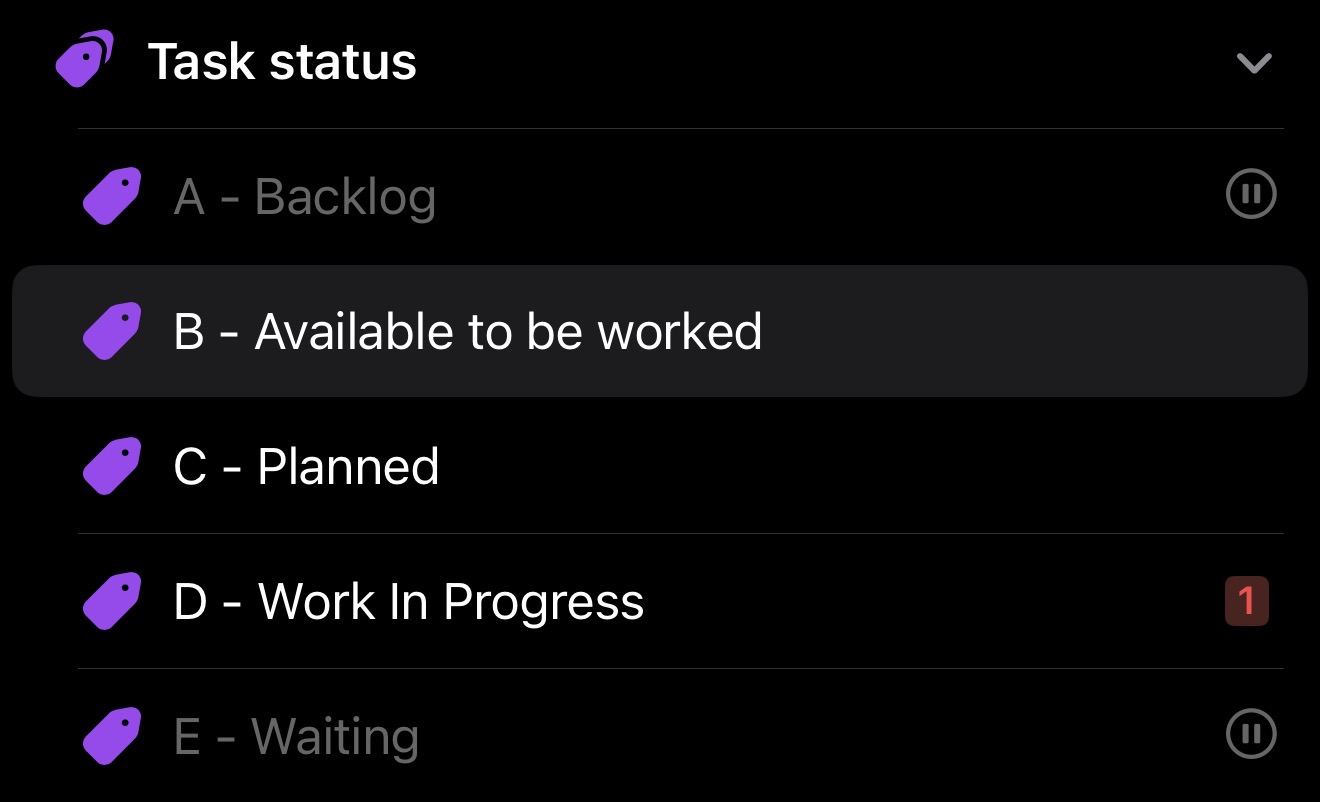
A - Backlog
B - Available to be worked
C - Planned
D - In progress
E - Waiting (for someone else to take an action)

Backlog and Waiting tags are set on hold so they don’t appear in my list of available actions

Projects are largely sequential to minimise the number of actions that show in my perspectives as available to be worked. Projects can also be put on hold if you can’t or don’t want to progress them.

And perspectives allow me to further limit what I can see.

One of Omnifocus’s superpowers is allowing you to disect your tasks to show you a subset of things you can do.

The Someday/Maybe list is also worth having for things you want to do you’ve not planned.

Have you read the Getting Things Done book?

Just out of curiosity, how do you implement these A to E categories, via tags?

Yes via tags. Mutually exclusive tags

2 Likes