Does OmniFocus 4 either natively support or allow users to generate a collection of tasks that should be performed Today? It doesn’t particularly matter if this is achieved through a Today custom perspective or as part of the Forecast perspective.
I’ve been doing this in OmniFocus 3 through the use of a Today tag but this solution isn’t ideal in the case of repeating tasks since the Today tag will carry over to the next iteration of that task.
I’d like to achieve a solution that would allow me to pick a couple of specific tasks that I’m prioritising to work on today without adding tags or flags that will carry over in the case of recurring or repeating tasks.
Not sure if they work for OF4, but Kaitlin Salzke has written a series of plug-ins, one of which allows you to perform a series of actions when a task or project is marked complete. One of the available actions is to remove a tag, so it seems you could carry on with the Today tag as you have been using it, but then use this plug-in to remove the tag automatically when you complete the task.
Thank you for the links! It would be better if OmniFocus had a native way of achieving this without needing plugins but this does look like it might get the job done, at least on macOS. Do OmniFocus plugins work on iOS as well?
Yes, they work on i*OS as well. In Settings > Automation, switch on Developer Mode and then you will get Omni Automation as an option in the (…) menu at the top of the screen on iOS.
Sorry – I don’t seem to have the appropriate access level on this forum to upload an image to show the menus.
I think that the plug-ins are a good way of letting anybody add the functionality that they need – hence The Omni Group employing Sal Soghoian to work on the Omni Automation world. Hopefully we can tweak the app to exactly what we need 😃
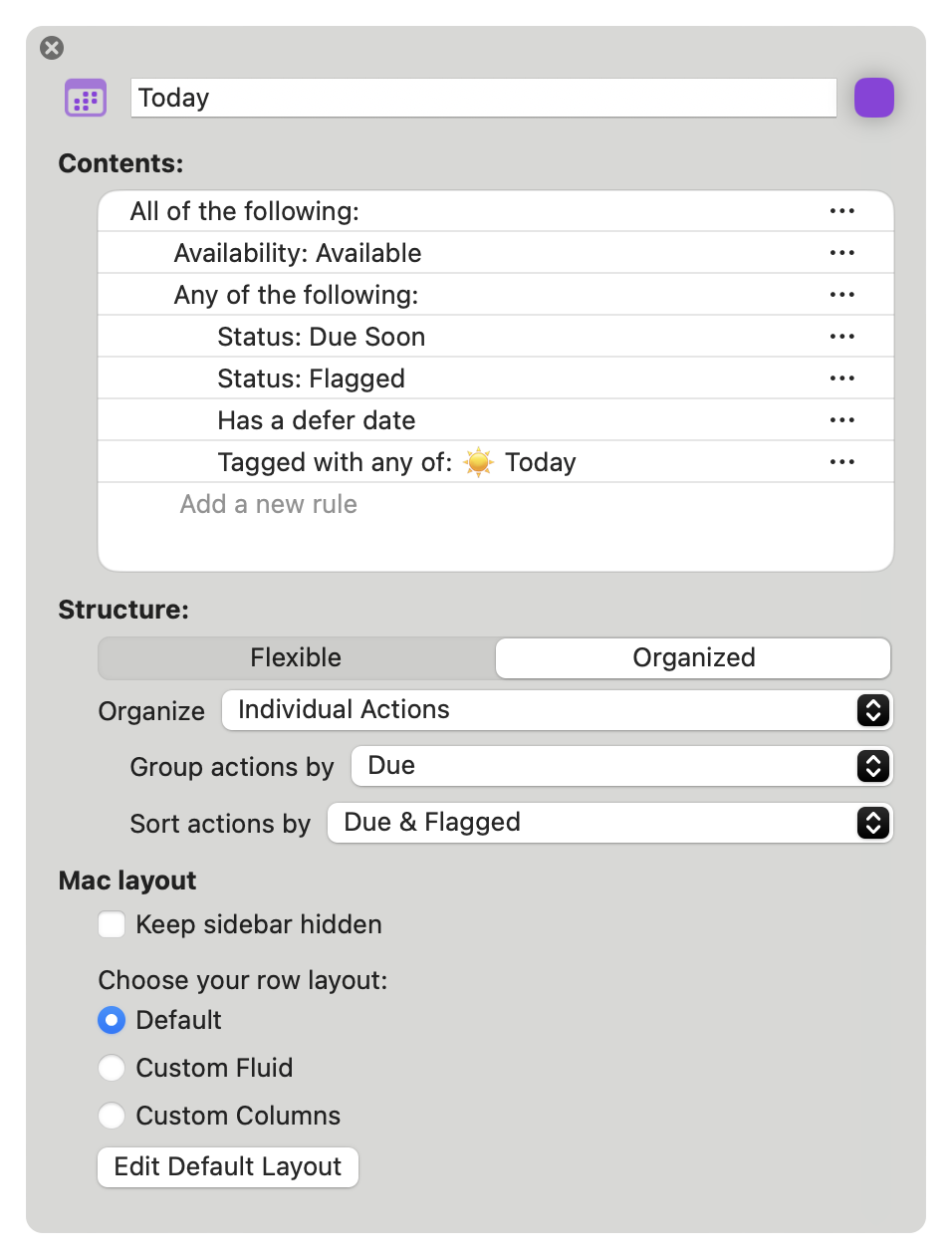
I can strongly recommend Tim Stringer’s solution. I use a similar created “today perspective” for my Omnifocus structure, which shows all tasks that are either tagged with “today” or few have become due due to their due date (important) or due to their “defer -dates” (all of my periodic routine tasks) become visible. I am happy with this way of sifting through today’s tasks and prioritizing them in this today perspective with special tags according to urgency, importance… (Eisenhower) in order to process them using 4 appropriately created perspectives.
The personal perspective is good for showing the tasks that you want, but you would need to clear the ☀️Today tag manually before completing a repeating task, otherwise the next instance of the task will also have the tag if I am understanding your solution.
The other way could be to create a duplicate of the repeating task, set it to non-repeating and add the Today tag to that task. That way, the repeating task can be completed, leaving the duplicate to show in the Today perspective.
If you take a closer look at the perspective and text of Tim Stringer’s post, you will notice that the perspective evaluates several characteristics of outputs. If Mr. Stringer due-dates his repetitive tasks, then he doesn’t need a Today tag for the task to appear today. When looking at the rules in the perspective shown, you should look at the condition “any of the following”.
These same rules make tagging repetitive tasks with “Today” unnecessary. I’m using many repititive tasks in Omnifocus. No one is tagged “Today”, cause these Tasks are displayed, if defer date is “today”.
To add to what @Monika shared, I find there’s no need to use the “Today” tag for repeating actions. All repeating actions will have a defer and/or due date. These actions will automatically appear in the Today perspective when they become available and/or are due soon.
I use variations on the Today perspective. For example, “Today: Personal” perspective is same as the Today perspective except that it’s focused on the “Personal” folder.
I write these type of tasks you’re describing on an index card and then go back to OF to check them off at the end of the day (assuming they’re complete) it removes the temptation to be distracted for me.
Electronic solutions aren’t always the best option for everyone and everything.
Good insights here! My way to manage and pick which task or projects I’d like to do today is to drag’n’drop them in the calendar app. This create a backlink to Omnifocus in the Event which is handy.
I use the Today tag in Forecast, even for repeating tasks. The key is I also configure a defer on the repeat. So, if I need to do something regularly and I’d like to do it today, but it doesn’t/shouldn’t have an actual due date I use this approach. For example, we have well water & I replace the water filter roughly monthly. This has the Today tag and once completed it is deferred for 1 month. It won’t show up in the forecast until the defer date has passed.
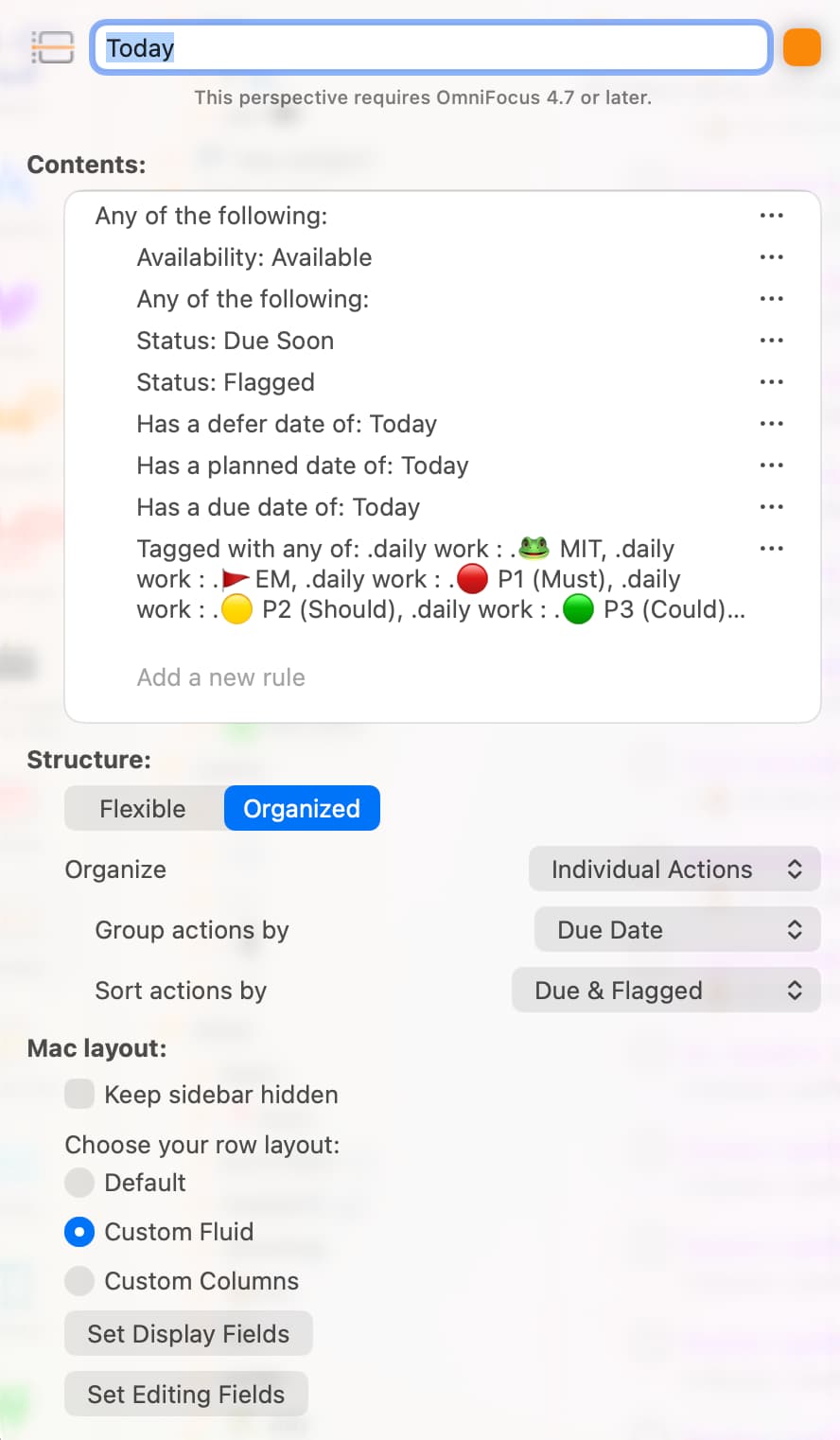
Appreciate the guidance and have subscribed to Learning OF in the past–also very helpful. I’ve created this perspective, but end up with completed and dropped items too from over a year ago that dates of some kind. I’ve tried to filter them out with “None of the following: Completed | Dropped.” I’ve tried changing the “Has a defer date” to “Has a defer date of: Today” (also planned and due dates). I cannot get these to go away. Any advice is appreciated from anyone!
Hi @chriscote. Great to hear you’ve found Learn OmniFocus very helpful!
I took a look at the “Today” perspective you shared. For this to work, you’ll need to change the top “Any of the following” to “All of the following” and nest the Status: Due Soon, Status: Flagged, etc. under “Any of the following”.
On a side note, I update the Custom Perspectives for OmniFocus resource on Learn OmniFocus regularly. This free resource includes custom perspectives that take advantage of the planned field, including two I use daily: On Deck and Today: Later.
Thank you very much for the kind reply, @timstringer. I believe I faithfully made the changes you suggested (and more importantly understand the logic behind doing so), the result of which is it displaying no items. Call me flummoxed.
Maybe the UI differs wherever you are using OF, but it looks like your logic is broken because of the lack of the appropriate nesting for ANY OF THE FOLLOWING and NONE OF THE FOLLOWING. The rules contributing to that logic should be indented underneath those logical operators.
Thanks for the suggestion. I’m on a Mac and don’t see anyway to make items indent–even if I create them from scratch. I can drag one like “Status: Due Soon” on top of “Any of the following” and see it highlight, but when I release it the position is maintained. I’m going to delete it all and start from the beginning to see if that makes a difference.
Don’t understand why it didn’t indent to capture the nesting, but that did the trick. Thanks again to you and @timstringer! (I’ll checkout those other perspectives too)
Yeah it’s one of the many head scratching design decisions by OG. I do believe you can indent by tediously grabbing a rule and dragging it onto the logical operator it should belong to.
Since OF is a pseudo outliner and OG makes an outliner, you’d think they’d just have KEYBOARD shortcuts to manage ordering up / down, indent / outdent. Frankly, I should be able to just manually type out these perspectives, if I wanted to.
OF has a ton of promise but gets hamstrung by strange UI decisions and too much focus on slowly delivered niche functionality at the expense of easy core functionality wins.