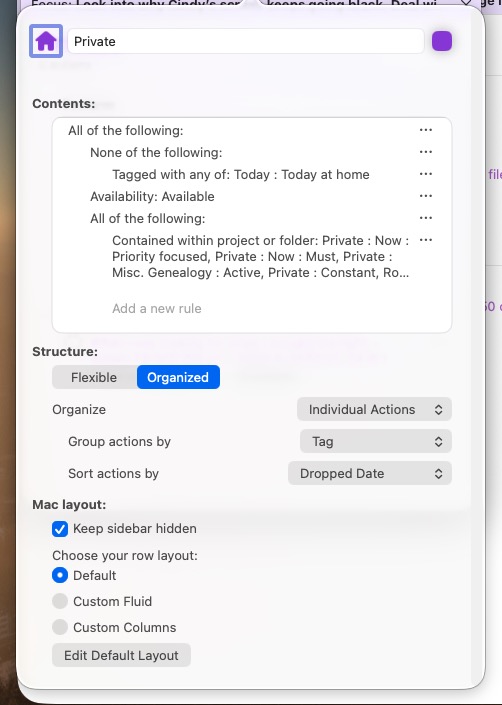
I have a perspective “Private” set up as depicted in the screenshot at the bottom of this post. Private provides me with a list of tasks that I can consider to work on, say, on the weekend. On Friday, I go through this list and focus on the individual items (i.e. projects) I want to concentrate on for the weekend. That reduces the available tasks to a doable amount.
I also work with Omnifocus on my iPad and iPhone. I’d like to be able to access this same focusing selection on these two platforms without having to perform the focus on them, too.
Is there any way to save the focused perspective? Either in the Private perspective itself, or perhaps by saving the window showing the perspective with focus as a new perspective, say “Do this”, that is shared to the iOS devices?
I’m running into a problem creating the perspective, though. The most straightforward way to do this, in my opinion, is just to tag the projects I want to work on. Now I can’t figure out how to set up a perspective to show tasks that are part of an appropriately tagged project.
If that is possible, I’d appreciate a pointer as to how to do that!
I suspect you’d then have to open each project as you worked on it.
I never thought about the fact that if you tag a project after adding task, those tasks do not inherit the tag. Only those added after you tagged the project.
This problem is easily fixed: in the Projects perspective, expand the project, select it and all its tasks, and then use the Inspector to apply the “Private Focused” tag to all of them at once.