Testing the next OmniOutliner

For those who might not have seen this on our blog


Great things often begin as outlines. Whether you’re a writer or a student, an attorney or a software developer, outlines can help clarify and develop ideas and concepts. Screenplays and books flow better. Speeches, dissertations, and essays make all the points you want to make. Class notes, meeting notes, and agendas have structure that makes them easier to understand. Projects and budgets are easier to visualize and plan.

We’re thrilled to share that the next version of OmniOutliner is nearly ready as a universal app for Mac, iPad, iPhone, and Apple Vision Pro, and that we’re making test builds available to anyone who wants to help make sure we haven’t overlooked anything.

Want to give it a try? Head on over to our test page, and check out the release notes. We look forward to your feedback!

(And we look forward to sharing more news with the rest of you soon!)
10 Likes

I haven’t tried it yet but my wish is for it to be less of an island. I want to get my data out into a format I can work with elsewhere and let others see also.

Primarily this means robust .docx and .md exports.

Fingers crossed!

Copy and paste to Markdown editors seems to work fine.

There are UI issues. The first line of an outline gets covered up by the toolbar.

I don’t see any way to escape a stored filter other than deleting the filter. There isn’t any button to unfocus from filtered view, and the menu command to unfocus doesn’t get me out of a filtered view.

It’s beta. Little things. Not unexpected.

What I was hoping for, though, was a paradigm shift. Imagine being able to keep notecards which could then appear by reference in the outline. Maybe allow multiple outlines drawing off of those notecards.

Or a mindmap view, independent of the outline. You could take notes in a mindmap about facts, then arrange them in narrative order.

A hurdle for OmniGroup seems to be a reputation for fussiness in OmniOutliner. I keep seeing other writers say they want the simplicity of Bike. Curiously, what they like about Bike, like arrow key reordering of topics, OO does just fine.

Given you can add arbitrary metadata in the form of columns, I don’t see a valid comparison with simpler outliners. In that regard, OO hits it out of the park. It’s brutally simple to operate and offers very flexible adaptibility.

What more could you ask for? Other than mind maps, data repositories…

Yes, I like to cast for fish and eat my lure, too. Or something like that.

Edited to add, CSV export works great. I don’t know how popular OPML is but I’ve used it.

Closing the loop on my complaints - the latest beta cures the UI issues I saw.

I’m not sure how well connected folders will fit into my workflow. My first thought is to put OO documents in the Devonthink database the rest of a project is in.

Would be very interested to hear how others are using connected folders.

1 Like

There are still bugs, but OO6 is still beta. Reported bugs are getting cured.

Other than a few minor rough edges, it’s very nice. I wrote my first automation yesterday.

It mimics the operation of a focus with a twist. A column called xref is used for tags. The automation looks for matching tags in a Research topic and adds the matches to the focus.

Click on chapter 5, run the automation, see the chapter 5 outline plus notes, which may relate to other topics in the outline too.

Can’t wait to start a new project and give this a test in the real world.

I have been long on the Omni-train- I have recently discovered how useful outliner is- but was shocked to see that in 2025 there is ostensibly no real integration between outliner and Omnifocus- Also- Omni Plan would make more sense to me if there was integration between it and Omnifocus. If Omni got really good at integration between their apps, they would dominate the productivity on Apple products. I’m not talking about crazy complicated either- I mean like- I have an outline and I click something “share to Omnifocus and create project”
I don’t know why the greater vision has lacked this- and I don’t know how hard something like that is- but the complaint that the Omni apps exist on island is a legitimate one. I would LOVE to see them change that in a global sense

A TaskPaper export/copy would essentially do that because you can paste it into OF to create projects with task outlines. I’d like to see OO6 offer TaskPaper and Markdown copy as and/or export.

OmniFocus has always had the ability to import from OmniOutliner, either using File > Import OmniOutliner Document… or simply Copy and Paste. Is there something you’re looking for it to do differently than it does already?

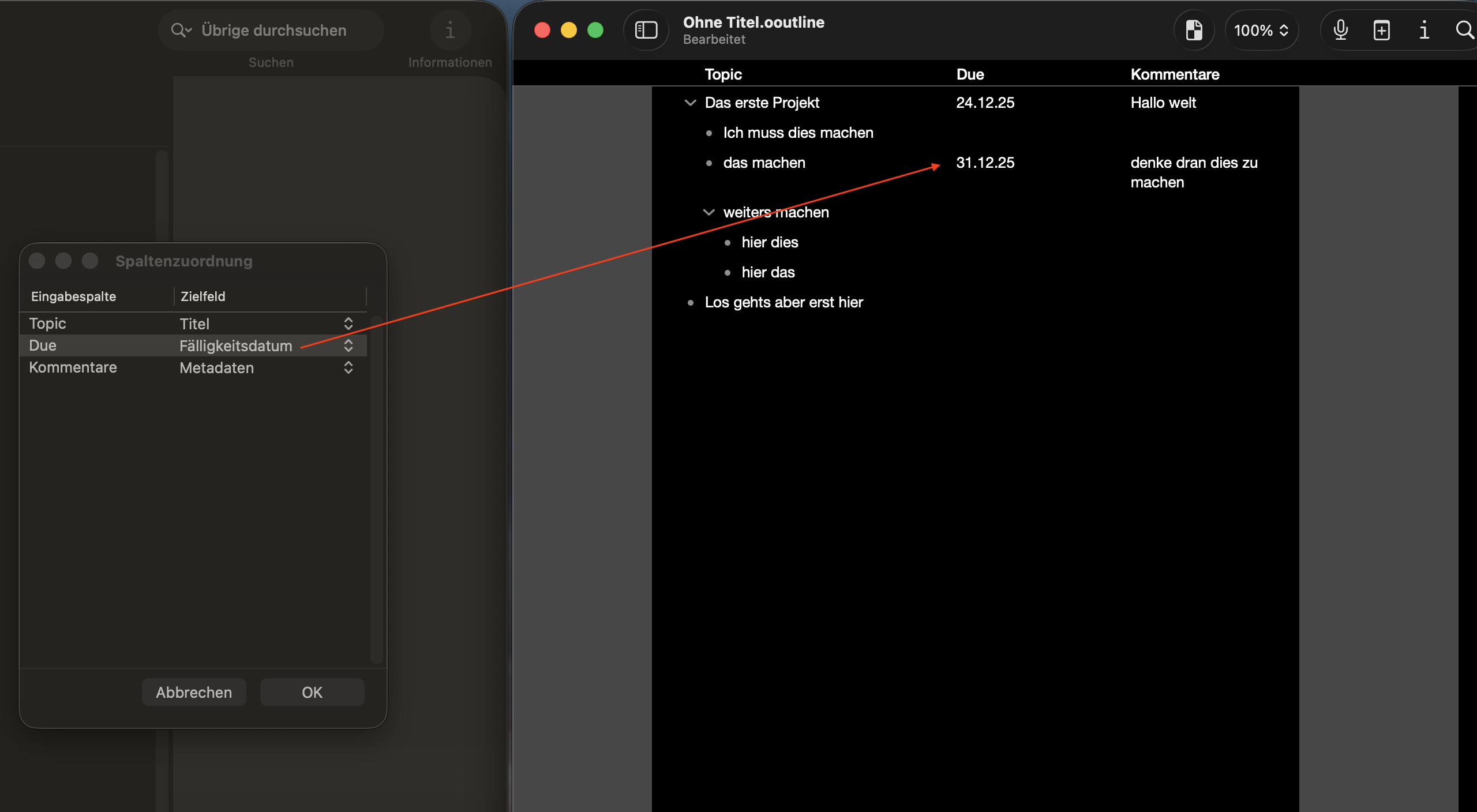
When you copy from OmniOutliner and paste into OmniFocus, it creates an outline of tasks that preserves the full outline structure, all of the notes (including rich text with attachments), and brings up a column mapper where you can choose which outline columns should map to which fields (e.g. mapping columns to Defer or Due dates). It will even preserve data from columns that don’t have equivalent OmniFocus fields, by letting you map those unknown columns to metadata (that gets placed in your notes).

1 Like

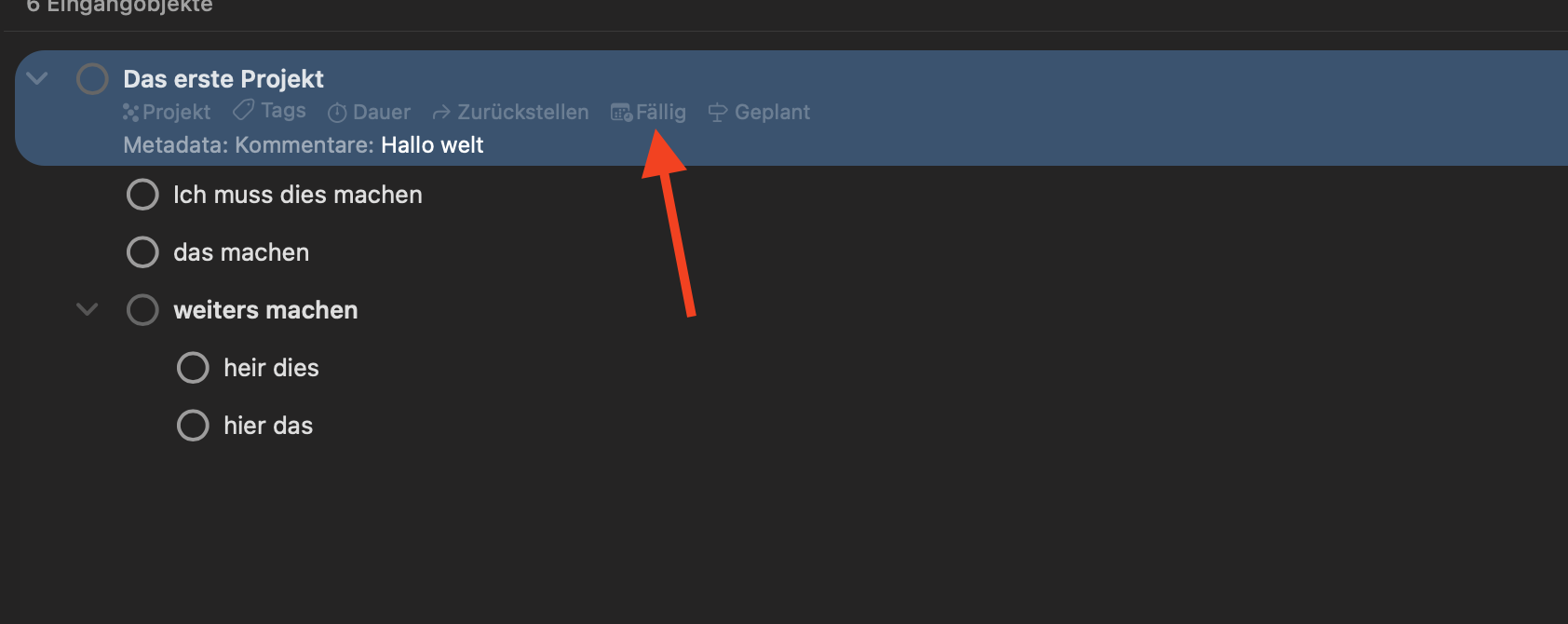
Just tested that Copy and Paste from the Beta, is not fully working. The Due Date field is not populated. Where should I report this?

Hmm, that’s strange! I did test and this was working for me, so I wonder if that’s a formatting issue for the date column (is it set to the Date column type?), or perhaps related to date formatting and parsing for your locale?

The best way to report this to the team is to use Help > Contact Omni or to send email to omnioutliner@omnigroup.com. If you include a copy of your test outline (along with the above screenshots), that’s probably the fastest way to track down the issue.

Thank you!

Yes, the Column is of Type Date. Maybe the Problem is that the USA/ Canada does use MM/DD/YYYY instead YYYY/MM/DD or DD/MM/YYYY and for my Date the 23 and 24 is therefore threaded as Month. Just the question of where the problem happens, in Omnifocus or Omnioutliner? Or should I send it to the omnioutliner adress anyway?

Hmm, sounds like it’s probably an OmniFocus bug. But feel free to report it to either address and we’ll route it to the right place!

I know it’s a 6.0 version, but could you consider eventually adding row level check boxes (rather than global), and also a true tag system, similar to OmniFocus which would really extend it’s usefulness? Glad to see this app getting some love.

1 Like

I have the following issues that when copy from other OmniOutliner content towards another OmniOutliner document, that then sometimes the themes get mixed up. I have also noticed that now that I put Dynamic Theme out and then sending information from one OmniOutliner document towards another, that then I don’t have these issues anymore. Strange.

I have the Omni Outliner files saved on devonthink, where there I have a file that I just copy or duplicate and use it as a template. That’s the way how I work.

Could the “themes getting mixed up” problem be due to manually applied format attributes being moved over to the other file?

How could i verify that this is the issue?

I’m not sure. If you open the Inspector and click the tab with “A” in a square, scroll all the way down.

You’ll see the attributes that have been applied and you can “x” them off individually.

OO styles kind of march to their own drummer. As best I know, you’ll see sections of attributes titled Whole Document, Level 1, etc. This is in the Inspector on the right edge, not the pane on the left edge of the OO window.

Above the styles, you’ll see “Selected text” or “Text insertion”. That will show attributes applied in addition to the native style of whatever you’re looking at.

I want to understand how OO styles work, so if someone can correct any misconceptions I have it would be most appreciated.