I love using the tag filtering on the side of some of the perspectives I use, but it seems that there is no way to use basic operations like NOT or AND. Why is that? Does anyone have an idea if the OMNI team is planning to create it in a future version? Or maybe I’m missing the fact that it is already possible…
Of course, I know it’s available in the perspective rules, but I’m talking about something else. Within a given perspective, the only operator that is available by choosing tags on the side panel is “OR”. SO if I choose tags X and Y it would show me items that have either tag(X-OR-Y). I would expect it to be possible to change it from X-OR-Y to options like X-AND-Y and NOT-X…
Can anyone share more details about this? Why is it like it and are there plans to add such a feature? It would help me tremendously in my workflows, because I like using this side-panel filtering when I’m organizing and action on many actions within a given perspective….
I don’t think it’s currently possible without creating another perspective.
I feel that gap sometimes, where a temporary/sub-/further-filterable perspective would be nice. It seems hard to design—not saying that means we shouldn’t ask Omni to consider it.
You do have to wonder how Omni develops their annual roadmap. Seems unlikely that they are influenced much by this forum. Might be entirely based on looking at what the competition is doing. Kanban will be nice.
This forum is for the members to help each other and share ideas. Omni staff frequent it, but don’t commit to gathering every idea discussed here.
If you have a feature request, contact the support team and they may add your idea to the potential feature list and/or add a +1 to an existing potential feature which someone else has already suggested. Sometimes they’ll outright tell you if they have no intent to progress a feature you suggest.
Omni do look at the potential feature list and have added many user requested features, They’ll have their own ideas and will keep an eye on what other products are doing.
People forget though that it’s Omni’s product and product vision and they get to decide how it progresses. They don’t have to add every idea that customers would like.
Every company making products has a vision for their own product. Some are more firm on that vision, others add features by the bucket load. No one way is right, both have pros and cons.
I like Omni’s approach with OmniFocus it leads to a really useful product which isn’t bloated.
In any event, it does seem entirely possible that Omni’s direction is largely determined through competitive analysis. A feature check list orientation. Existing users perhaps influence the direction by telling Omni about features that might cause them to switch to another app.
With respect to this forum, the question is really not whether Omni commits to collecting all the feedback, but whether there’s past behaviour to suggest they collect any of it.
This forum, and the OmniFocus support team, certainly prefer engaging in discussions on reasoned ideas for improvement rather than on random speculations about what others may or may not be thinking or about what OmniGroup may or may not be doing.
Formulate a well-structured example that demonstrates the advantages as you see them for having a Kanban style presentation in OmniFocus. Review and revise it against what is already posted in this forum about linking OmniFocus with Kanban approaches. Post it as your own starting theme.
So, let’s take a look at what’s on the 2026 Roadmap for OmniFocus. Perhaps that’s not exactly the product vision, but at least it provides some insight.
So, considering Kanban, that could just mean some new tags and a non-interactive Kanban chart based on the tags. Or it could be a more significant change, including a more fundamental notion of work in progress, or metrics, or whatever. Now, is any of this worth discussing on this forum? Well no, if your point about Omni gathering input from this forum not even being worth consideration holds (and I’m in no way disagreeing with that). So, let’s stop there.
Certainly, Omni will share their plans for Kanban. However, sharing doesn’t necessarily imply discussion. And if discussion with (and among) the product’s users doesn’t actually happen, then, clearly, it can’t be an influence on Omni’s product vision.
The beauty of the Omni Group apps is that they have been very thoughtful in providing Omni Automations to help us customize the app to our needs.
I use Keyboard Maestro and Apple Shortcuts to fill in gaps that OmniFocus doesn’t give me in its base feature set. I haven’t quite grasps AppleScript but there have been AppleScripts that have been written and generously shared online.
I wonder if your postings are because you don’t trust yourself to make a reasoned feature request (in a separate thread) or because you want us to agree to rationalize your perceived grounds for why your feature request might be ignored even if it is well-reasoned.
In the meantime, you are also stepping (brashly, adamantly, and thereby impolitely) on discussions intended to address the OP’s questions as the main focus of this thread.
Overall, you are doing yourself no favors in garnering good citizenship points.
Just thought I’d point out that OP makes clear that their question is not about perspective rules, which is what you are discussing, but about the tag filtering that appears to the side of some perspectives. It is, indeed, true that selecting multiple tags performs a logical OR and that no other logical operation appear to be available.
Yes. I see now. I guess I could amend my previous comments as such. I’ll add below instead.
Indeed, no logical operation is available in the filter panel as an explicit switch, even the logical OR. The counter argument is that base logical operations AND, OR, and NOT are all implicitly available with appropriate selection of the rules in the filter view.
In this regard, with a more careful reading, the request seems to be to have an explicit set of logical toggles AND, OR, NOT, … to allow dynamic toggling of views using the filter side panel. But, results change in the view panel only AFTER the filter panel is closed. For the behavior of the filter view to be truly dynamic, any change would have to cause an immediate change in the perspective view window.
Otherwise, you can achieve the desired toggle effect by this approach:
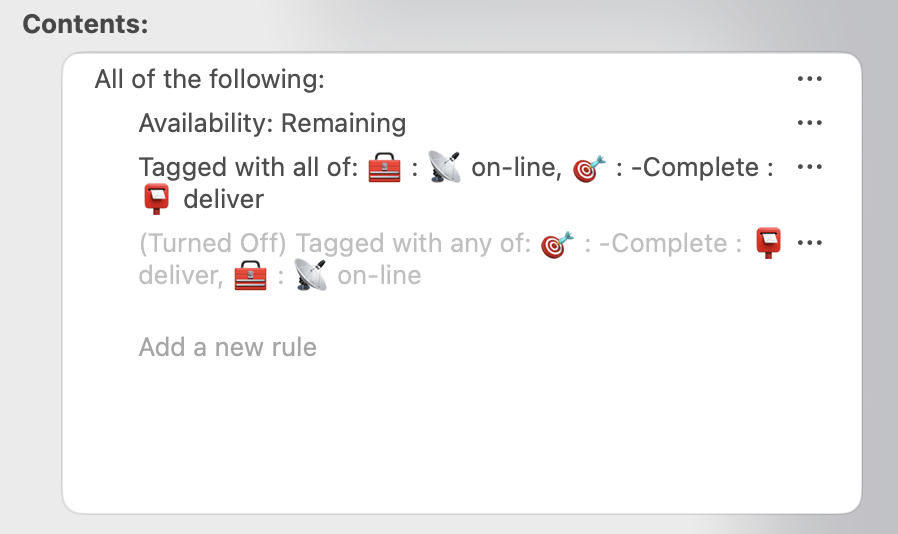
Set a predicate rule for All of the following:. Within that predicate rule, set the following two rules:
rule for Tagged with all of: (your choice of tags) – the AND condition
rule for Tagged with any of: (same choice of tags) – the OR condition
Turn OFF the rule that you do not wish to view
When you want to toggle between AND and OR, open the perspective filter, turn ON the rule that was OFF, and turn OFF, the rule that was ON. Here is an example with the logical OR turned on and the logical AND turned off.
So, in summary, OmniFocus does provide a way to achieve what is desired for a perspective. Set up all desired logic rules in the filter panel. Turn the appropriate rules ON or OFF selectively before closing the filter side panel.