Hi @Geoffairey, glad it’s working now. Interested to know what happened initially given the update? The way Flowcus works is that it fetches all tasks that are OmniFocus considers “Available” and ignores all blocked, on hold or deferred tasks. You can filter by Tag by pressing ⌘-⇧-F to hide any tags you don’t want to see. Let me know how you get on!
The onboarding worked correctly. for some reason it wasn’t showing my tasks at first but when I reopened it later it did.
Do you have any plan to be able to link Tags to the Column and/or Swimlane so that changing tags in OF would also update Flowcus, but also that moving something from one column to another would update the tag in OF
Hi @rhydlewis, thanks for fixing the import. I can now see all my tasks! Is it possible to ignore folders when fetching tasks in Omnifocus? I have many folders for specific areas or subprojects, each with more specific tasks and subtasks. Importing all the folders and subfolders pollutes my Kanban view and doesn’t always make sense because they aren’t actionable. Could it be a toggle in settings to disable folder import, or is there no way to make this distinction when importing?
Would it be possible to include only the first sequential task in a list, as a toggle option?
1 Like
Not currently. To me a tag is a way of understanding how or where the actions needs to take place whereas the state of the task is different. Flowcus offers more nuance around status (instead of Done or Not Done in OmniFocus) but does this through its own mechanism. I don’t see a way of using tags to track status without a significant rewrite.
1 Like
That’s a good shout - yes, I can see why selective import by folder is useful. I’ve got a feature underway to support this. Will let you know when it’s ready.
As for first sequential task in a list… yes, it should only import task 1 from this project but I can see that it’s pulling in all 3… 🐜 alert… Will take a look.

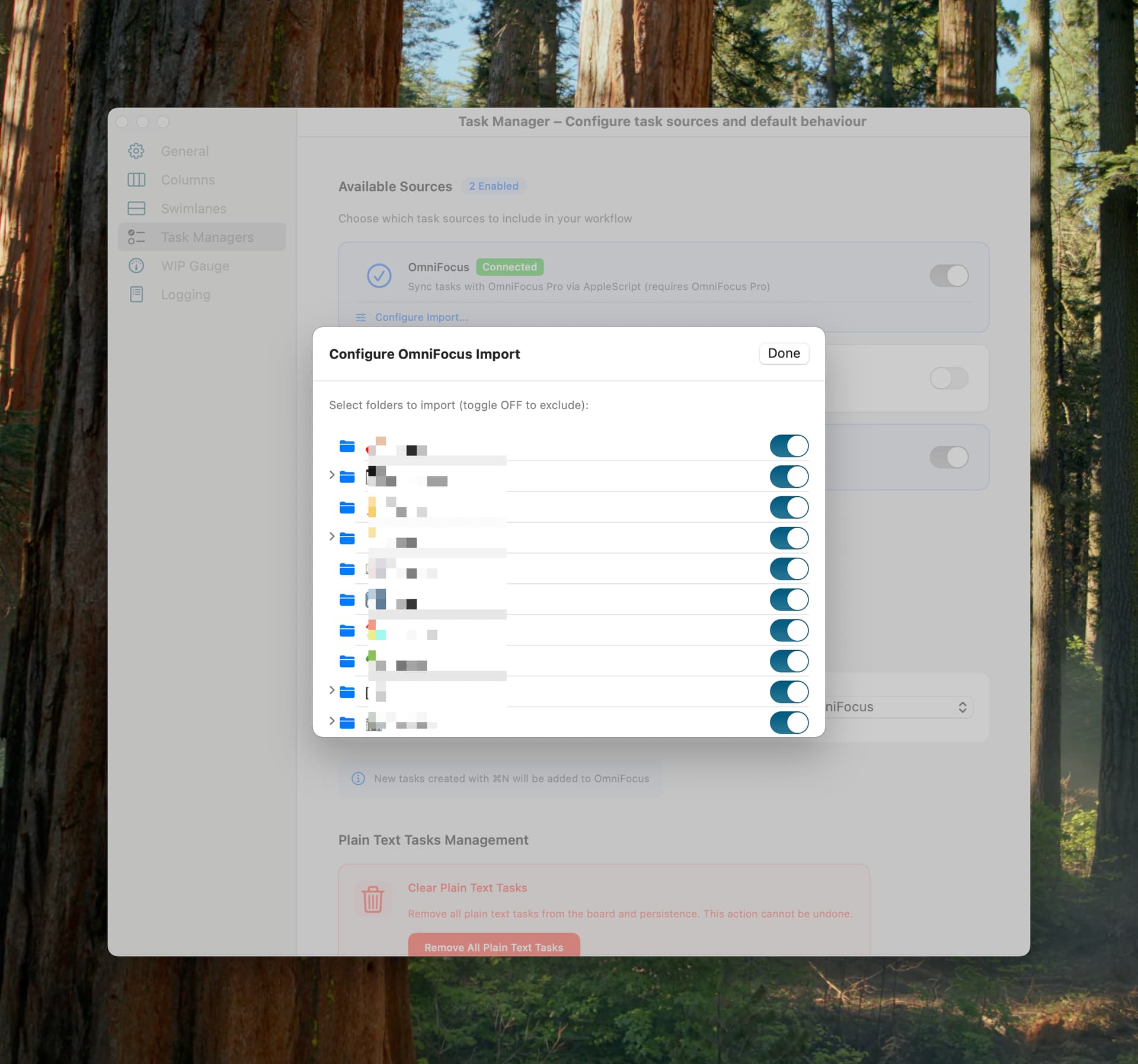
See latest version v0.2.7-233 which supports filtering task imports by folder and fixes the bug that pulled in all tasks not the next task for a sequential project. Let me know how you get on?
Go to Flowcus > Settings > Task Managers > Configure Import… underneath OmniFocus to disable folders
1 Like
@rhydlewis, thanks for the changes and ability to customise!
Things I noticed:
- in your app’s kanban view, I can see old tasks if I dropped a whole folder containing them when they’re active. However, if I drop only the task, it won’t appear.
Even without including any folders, items from old, dropped folders seem to be imported into the column. I can reproduce this by creating a new folder, adding projects with subtasks inside, and then dropping the folder.
The view in Dropped tasks perspective

the subtask of dropped task still will be added as not dropped
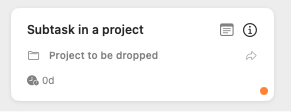
Creating tasks in a dropped folder without subtasks doesn’t seem to bring this behaviour.
Point 1 might be a bug within Omnifocus. Manually creating perspective to see all dropped items and manually dropping the tasks and subtasks seems to fix the issue
So basically better filtering out status “Dropped with container” is needed
- In the “Configure Omnifocus Import” pane, apart from the active folders, I can see some really old folders that aren’t active anymore. However, the recently dropped folders aren’t visible there, which makes it difficult to pinpoint the exact issue with the bug.
@aczkolwiek No worries. Regarding the 2 problems you’ve seen:
Issue 1
I can’t reproduce this… I think I’m following your steps:
- Add a task to a project in a folder → Task appears in the kanban board
- Drop the folder in OF and refresh Flowcus to pull in tasks
- Task no longer appears on the board for me whereas you’re seeing it
One thing to check: Flowcus uses a 1 minute cache. If you refresh tasks in Flowcus, switch to OF to drop the folder and then back to Flowcus to refresh in under a minute, then the task will remain on the board. If you refresh after that time, the task should be removed… I might need to make the caching time configurable/optional (or at least make it obvious that Flowcus hasn’t pulled in new data)
Issue 2
Flowcus fetches all folders that aren’t hidden (i.e. dropped) but I’ve missed a secondary check that OmniFocus offers: effectivelyHidden (i.e. folder B isn’t dropped but parent folder A is). That’s fixed in the latest release. Check for updates from the Flowcus app menu to get a download link.
@rhydlewis, thanks a lot for your hard work! I think better filtering out what is fetched might have helped with both issues. The task that showed up had a status of “dropped with container.”
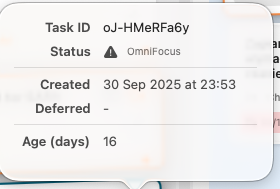
I also have another small bug I can’t reproduce. I dropped a task in Omnifocus, but it still shows up in Flowcus with this “Error Attention” icon.
I have one folder and 15 tasks in a project in Omnifocus, but Flowcus shows me 18 tasks. This includes 3 dropped tasks with a “danger” error triangle label. The dropped task has the “danger” triangle label close to the note place in the header.
EDIT: The danger triangle indicates that a task has a deadline assigned to it. So, it’s likely that the dropped tasks are shown because they still have deadlines assigned to them.
EDIT 2: After removing the deadline from dropped tasks, they still appear (the deadline is removed, but dropped tasks are shown after refreshing).
EDIT 3 I was annoyed, so I moved the problematic dropped tasks to another folder or completely removed them, so it solved the problem for me
Thanks @rhydlewis, I appreciate being able to try Flowcus, I can see the use for some people with smaller workloads, but the app isn’t for me.
1 Like
Ach! Good spot. New release v0.2.9-266 now filters out dropped tasks.
One thing I’ve been mooting though is the idea of importing dropped tasks but showing them in a new column to the right of the Done column (“Dropped”). Would that be useful from your POV? Would mean you could drop a task directly from the board.
Thanks a lot for all these fixes! I usually drop tasks that aren’t well planned or just used as reminders for myself to add more specific ones. However, this isn’t something I’ll use a lot, probably.
If you prioritise development features, I think customising swimlanes with further fine-grained ability disabling and enabling Omnifocus folders per swimlane would be useful for me. This way, I could have separate swimlane work projects and swimlane home projects.
Nice idea - hadn’t thought of that… configure swim lanes automatically based on folders… Will have a think. Cheers!
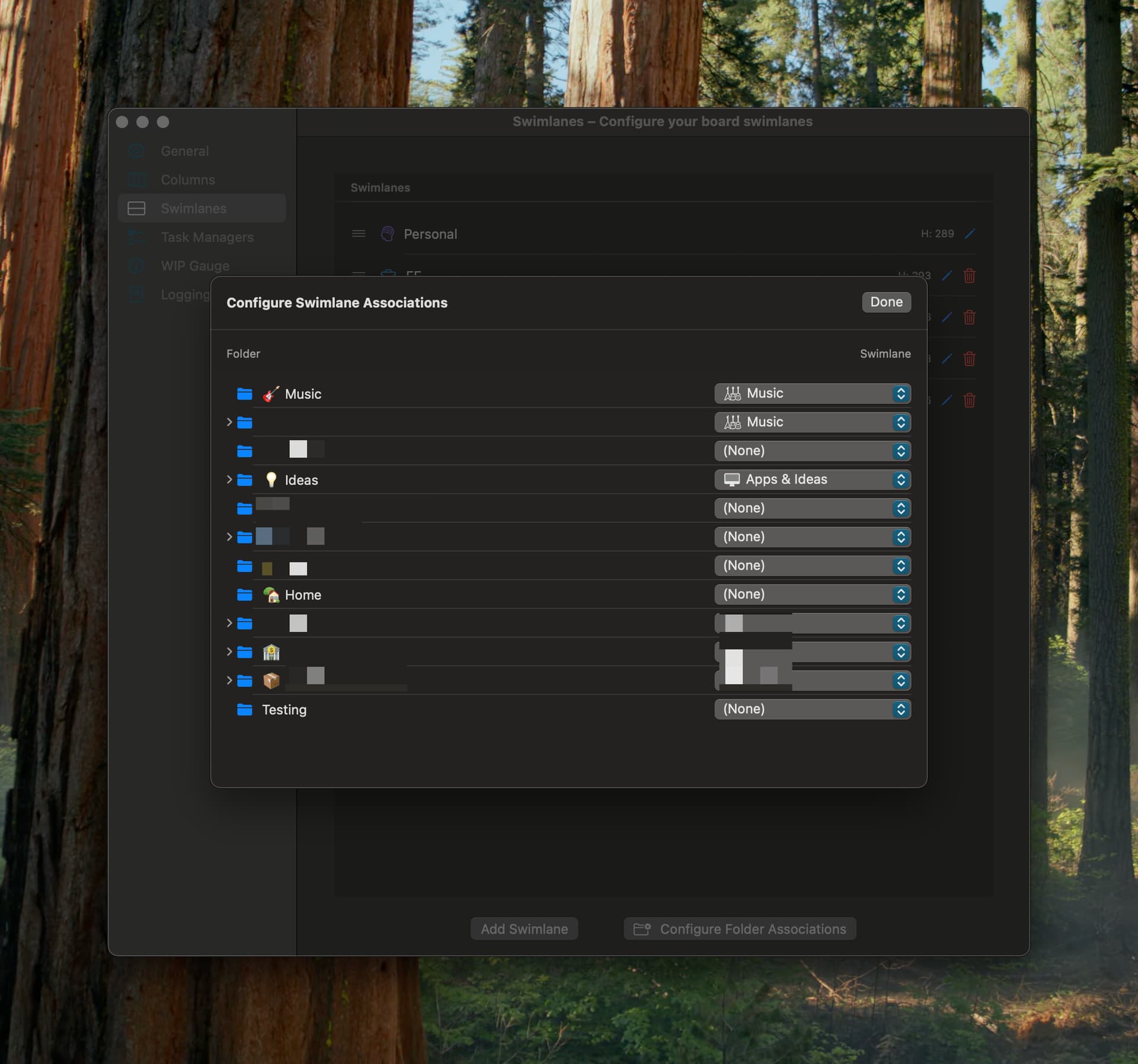
Releasing an update later this week which supports routing of tasks to specific swim lanes based on OmniFocus folder. Working well for me in testing. Taking a bit of time to sort out as it’s involving some big changes.
1 Like
It looks really nice! Thanks for your work!
Not so much of a Kanban enthusiast, but really appreciate what you do!
Latest Flowcus version 0.2.10-288 now supports:
- Smart Folder routing - Tasks now automatically route to the correct swimlane based on their folder in OmniFocus. Set up your folder associations once, and new tasks will find their home automatically. Go to Settings > Swimlanes > Configure Folder Associations
- Board-Wide Search - Quickly find any task across your entire board with ⌘F. Search results update instantly as you type, making it easy to locate tasks no matter where they are.
I have tested migration from the last released version to this and it should keep your columns and swim lanes intact. Any problems please let me know.
1 Like
I’m releasing Flowcus v2 soon. It’s is a different proposition and completely rewritten from the ground up. It provides:
- rule-based column and swimlane assignments to automatically place tasks where they belong
- multi-tag support lets you slice work across dimensions that a single category never could
- a proper task inspector to give you full context without leaving the board
- a command palette with natural language commands
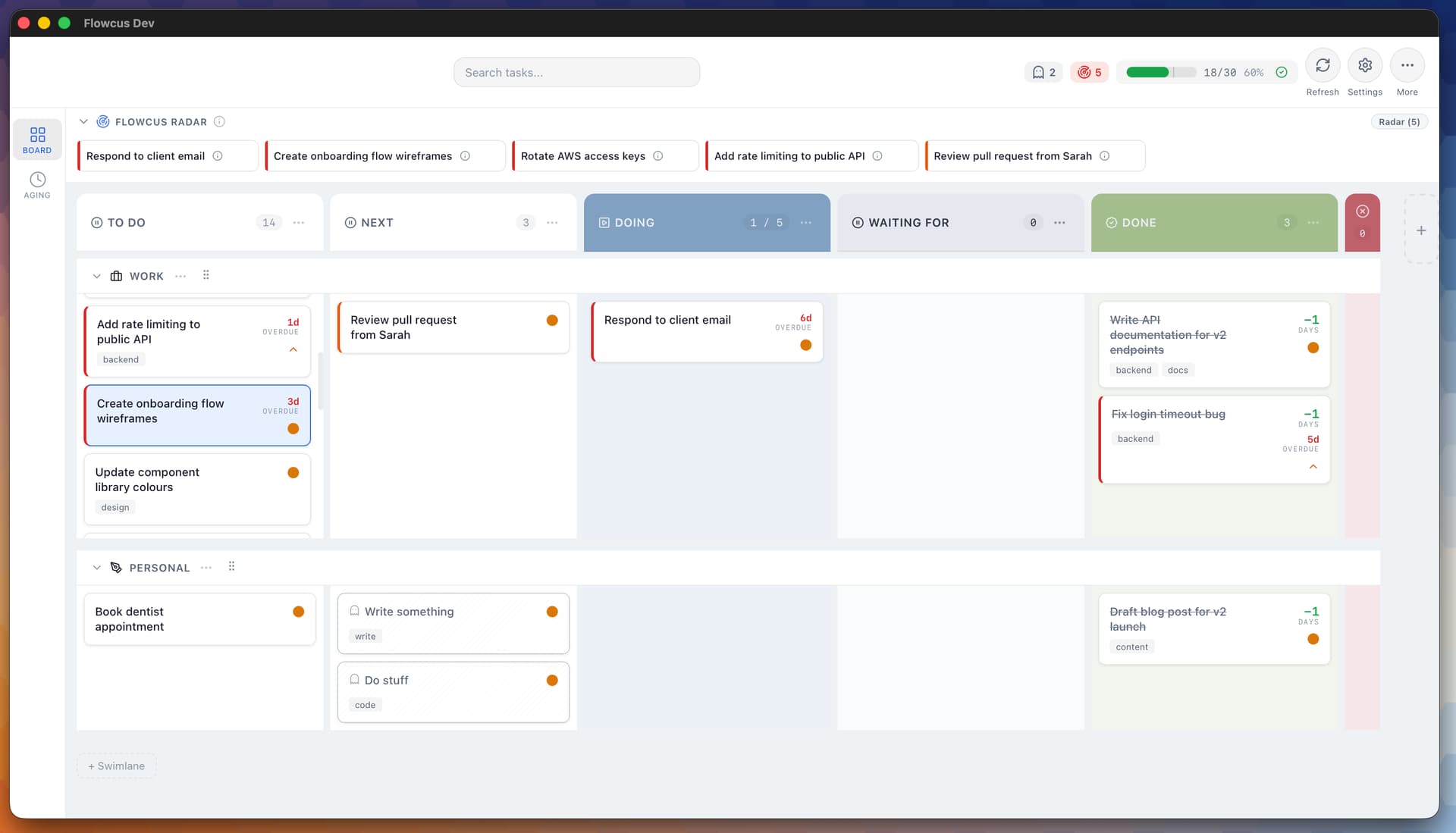
It also surfaces what matters and what’s stale:
- Radar analyses your open tasks each day and presents the 3–5 you should focus on, scored by urgency, momentum, and neglect — with clear reasons why each one ranked.
- “Ghost” task detection does the opposite: it finds the tasks you’ve been avoiding, the vaguely defined ones, the ones that slipped backward and prompts you to deal with them before they become dead weight.
- Task history powers both, giving you an audit trail of every state change so nothing hides in plain sight.
And there’s a some optional AI baked in too (of course there is). Sidekick brings AI directly into your workflow for task refinement, breakdown, and planning — without leaving the board.
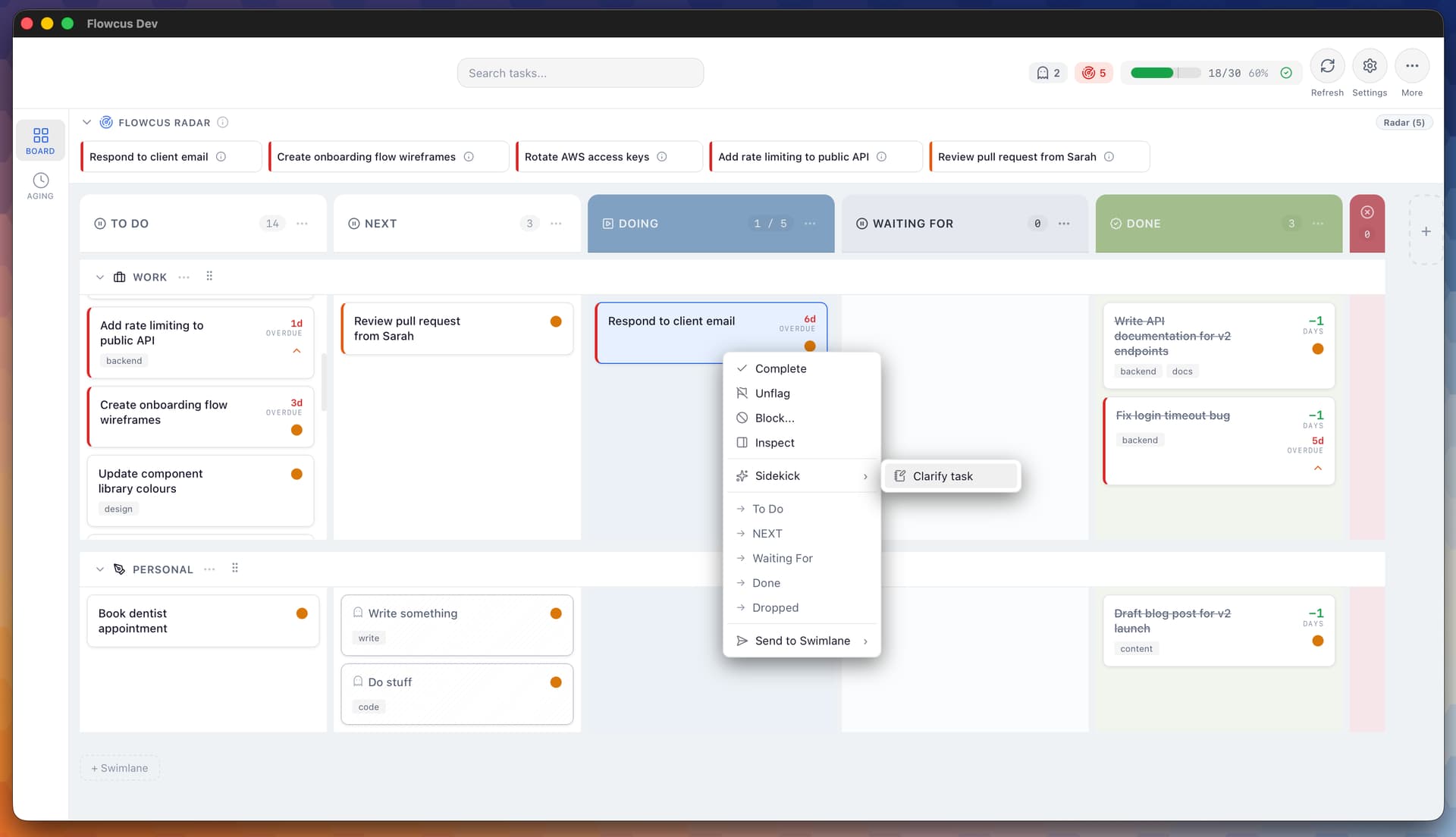
🧪 Interested in trying v2 early? I’m looking for beta testers - drop me a line here or at support@getflowcus.app. Cheers!
1 Like
I’m interested to see more if it allows tags to map to columns please @rhydlewis
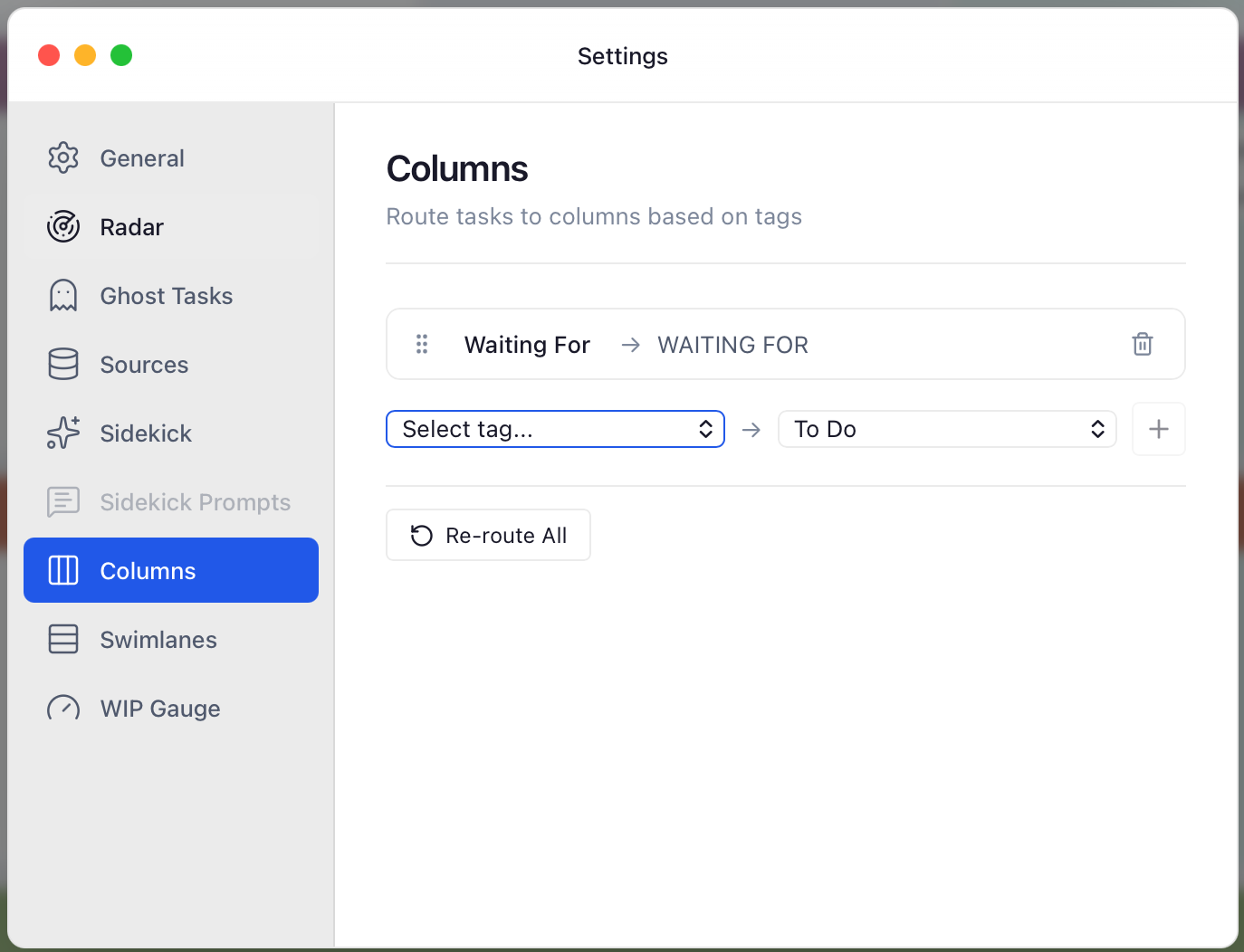
It does @Geoffairey. I use it to map a single tag (Waiting For) to a column called - drumroll… - waiting for. Means all tasks that I’m waiting on others to sort out show on the board but in the specific column. Latest release v2.0.77 available at https://getflowcus.app
1 Like
