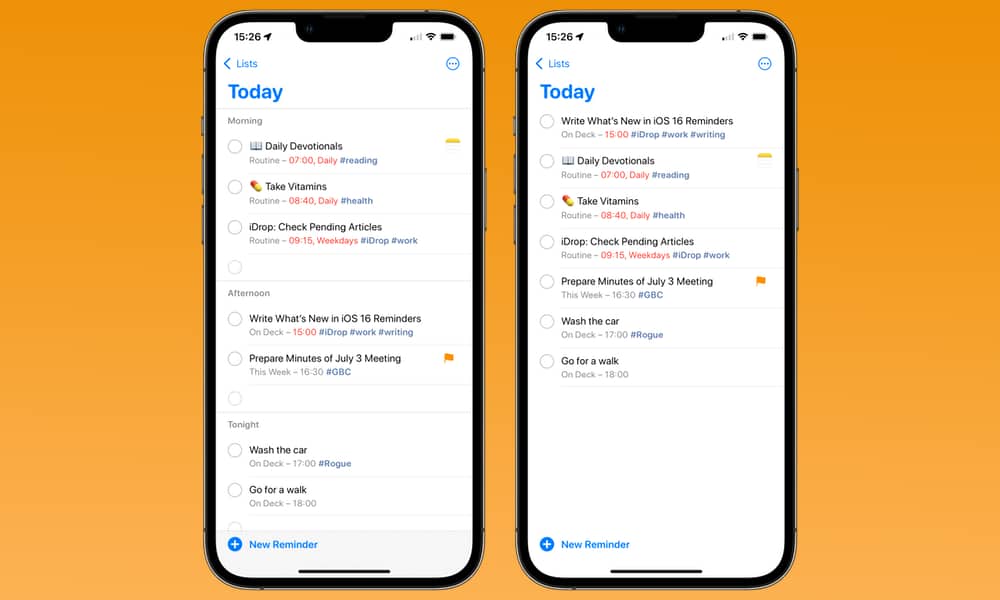
Can we have sections, please? Things has them, Reminders has them and they would really help in creating order in longish lists of actions.
Example: Assume my “Today” perspective as 20+ actions. Actions that are important, actions representing calls I have to make, actions at the end of the day, actions on the way home, actions that belong to a particular project, and actions that are errands I want to do during lunch break. And then more actions I need to do before lunch at work and more actions I need to do after lunch at work. I want those sorted by project order.
I want to organize these in appropriate sections so they jump out visually as forming a group. Like in Things. Note this is not “just use tags”. Tags are great but way too hard to read.
Sections could be purely visualization, although it would be probably best to treat them as “virtual projects” or “virtual folders” — meaning actions know which virtual projects/folders they belong to and where in the sort order they slot in. OF could even reuse the project or folder visual language.
For me this is the beauty of OmniFocus, especially its use of perspectives.
Its superpower is being able to show you only what you need at that time.
The night before, I look at what’s due for tomorrow and book time into my calendar. E.g. half an hour to make calls, an hour to run errands. Then at the time I’m due to run errands, I open my Errands perspective and I can only see applicable tasks.
Why would I want to see the errands I need to run when I’m making calls?
This doesn’t work for me because much of my day depends on what’s going on in the world around me. Plans change.
The very job of every to do list in history is to list what you have to do, typically today. Then you work down your way, changing priorities from time to time because, again, unless you live in an OCD world, things change.
This works fine if you have 5 things and becomes tedious if you have 25. Hence my ask to add sections so I can reduce the 25 things back to 5 sections.
It is so basic to me I really don’t understand why OF doesn’t have them when every other task manager does. See Things and Reminders:
Morning/afternoon/evening breakdowns would be nice in forecast. I try not to let my forecast get too crowded, but it does happen and it can be hard to visually parse.
For the example where you want to break apart a project into sections, I’d just use top-level actions and subgroup. You’d still want a different color and margin around the top level actions, I understand.
Multi-select of perspectives would be neat and probably handle the rest.
For the example where you want to break apart a project into sections, I’d just use top-level actions and subgroup.
That’s Project mode. Folders, Projects and Group Actions all make up the one half of OF that is in Project mode, i.e. the perspectives where you Organize “Entire Projects”. The other half are the perspectives where you Organize “Individual Actions”, which you could call Tag mode.
What I am clamoring for is a third mode, “Group” (or “Section”) mode. Groups can be anything and need to be independent of Projects.
This should be all done internally. Ideally just drag and drop actions into sections. Add/delete sections arbitrarily, per perspective. If new perspective, offer to use section membership of previous perspective(s) but still allow manual drag/drop. Just like sorting, which is also specific to perspectives.
Things offers headings in projects and yes having used Things for a year or more before coming back to OF I would agree they are quite useful. In custom perspectives I would think it would be a nightmare and tags just make more sense, doing the job without creating even more “stuff” needing maintenance
Totally agree, sections are there to reduce work and cognitive load, not create more.
All I am asking for is to let me visually group tasks. When I don’t need them, they shouldn’t be there.
Technically this already happens in the forecast view… though it isn’t split into sections. If you have a planned time for the task (like morning), those tasks show at the top of the list. As your projects are in effect a priority order, if two tasks have the same planned time, it uses the project order to display them. If a task is due by the end of the day, it would show down there.
I make good use of the planned date (and time) to lay out my day. The tasks at the top of the list are what I want to get done earlier in the day. It makes it super simple as I’ve planned everything for the day in advance. I just go thru the list from top to bottom. Having them grouped doesn’t really seem like a benefit to me, since what would they be grouped on? Time ranges? Projects? I can just organize the planned datetime and the projects and get this for free everywhere already.
Totally up to you. When you sort through a stack of stuff on your desk, you create a bunch of stacks. One may be “probably junk mail”, the other “deal with tonight”, another “bank stuff”, etc. The point is you reduce 40+ things down to a handful of stacks.
Grouping things is single most useful tactic to get on top of things, which is why every task manager supports it. Except OF.
Users must be able to create whatever groups they want. The whole point is to reduce complexity, not create more. OF already suffers from too much systematic rigidity. Every minute I need to handhold the system is a minute I can’t get sh*t done.
It sounds like what you’re looking to do is already addressed with custom perspectives. You can create as many as you want, have filters for what is included, define how they are organized, grouped and sorted as you need. I have several of these that I may reference when planning work.
Unfortunately none of this works. I can list actions from a projects perspective or from a tags perspective. That’s it. No amount of custom perspectiving (if that’s the word) gives you groups. You can say “show me these actions” and you can say “sort them in this way”. What you can’t say is “and group them in this way”.
All we need as an SQL query builder as I’ve written here.
Perspectives are the way to segment your work/actions in OmniFocus.
Your working method obviously works for you, I don’t understand why you want to see all of the “Groups” at the same time. I much prefer to focus on one “Group” at once.
That’s how OmniFocus is designed too. To expose a subset of items however you want to arrange them.
It’s not designed to do what you want. But you do you.
If you want to see all of your groups, suggest it to Omni, in the meantime pick one of the “every other” task managers which you say does what you want.
Omni don’t have to cater for every eventuality.
Edit: Reading it back this sounds angry, it’s not. I refer you back to my previous answers. Tell Omni you’d like it and they’ll consider if they think it will enhance OmniFocus in their view. But otherwise it’s not currently possible.
That’s what Tags are for. They allow you to assign an item to multiple Tags too. It’s the same concept, in fact it’s even better, you can setup many different types of tags. Action status, location, energy level, People (delegation) or people (Discussion), tools required, priority…
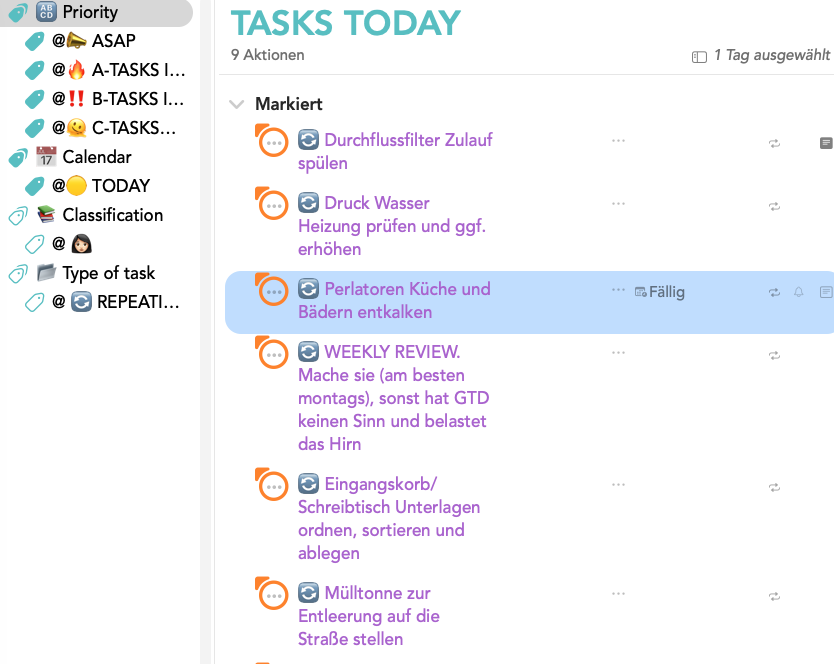
Omnifocus isn’t a scheduling system. It’s a great task management tool. A much better, more flexible, and more detailed method for scheduling your daily tasks from OmniFocus is to use split-screen mode (OmniFocus on the left, iCal on the right), instead of making the daily planning in omnifocus. I’ve been doing this for quite some time now and I’m absolutely thrilled with it. I’ve created three types of calendars in iCal:
A-TASKS: Must do
B-TASKS: Should do
C-TASKS: Would be nice to do
I drag the OmniFocus tasks from the “Today”-perspective-view, the ones I want to complete that day, into iCal and assign them to the appropriate calendar (A-B-C method) with different colors. This gives me a cleanes, visual overview of my day and the appointments for the entire week or month, and I can see the priority of the tasks at a glance.
Example: Today = free day (not working in company)
I think I’m repeating myself from a discussion, but “is in perspective…” would be a nice perspective filter for OF that would fit into its existing way of working. And then it could offer group by perspective. I suggested this to Omni. Raw SQL sounds unlikely, but maybe plugins will get there.
A lot of systems that work at 9 tasks per day break down at 90 (or even 27).
I have a system set up that “works” with the ~50 tasks I am dealing with daily that is very similar to Monica’s:
Due today means “Must do”
Flagged means “Will do”
Today tag means “Could or should do”
Everything gets tagged with one tag out of a mutually exclusive set of tags which I then select as a tag filter in my Today perspective.
It works but it is clunky, even though I wrote 4 plugins to support this workflow.
Above all, though, it is dumb since all of this is just working around utterly stubborn limitations OF imposes for no reason at all on how I can query and display data.
OF is a database with a visualization frontend connected (and crippled) by a poorly designed domain-specific language.
Given that OF’s only raison d’être is to support “advanced” task management that’s a pretty odd product strategy I would say.